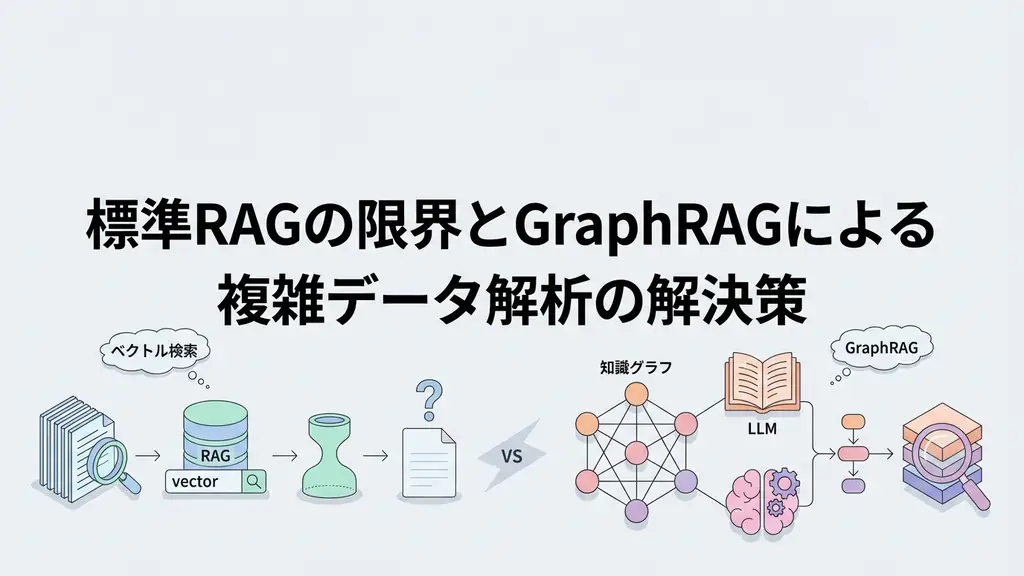
As engineers building RAG (Retrieval-Augmented Generation), we are constantly fighting the risk of “oversight.” Especially when working with PDFs and technical documents, it’s impossible to fully grasp the meaning of documents using only text information. Line graphs that occupy half the page, complex system configuration diagrams, or screenshot images. These have been treated as mere noise or “gaps” lost to OCR in traditional text-based RAG systems.
However, with the evolution of LLMs (Large Language Models) and image understanding models, the situation has changed dramatically. “Multimodal RAG,” which maps text and images to the same “semantic space” and searches across entire documents, has become a realistic solution. In this article, we go beyond mere concept introduction to delve into the internal operations when actually building systems, specific implementation code, and application cases in business settings.
What’s Missing with Text Alone
In traditional RAG architecture, images in documents were either converted to text (OCR) or ignored. OCR has limitations. For example, consider a bar chart where blue bars exceed red bars. OCR can extract fragmentary text data like “blue,” “red,” “100,” “200,” but the visual relationship “blue is twice red” is difficult to reproduce with text information alone.
This is where technologies like CLIP (Contrastive Language-Image Pre-training) come into play. CLIP is a model trained to place images and text in the same high-dimensional vector space. This places the text vector “cat image” and the actual “cat image” vector at close distances.
Multimodal RAG uses this mechanism to vectorize each image in documents and store them in a vector database. When users ask questions like “Find graphs with declining sales trends,” the query text is vectorized and similar images (graphs with declining trends) are searched in the image vector space. This makes it possible to retrieve information that would never have been hit by text search.
Technical Explanation: Internal Operation of Multimodal RAG
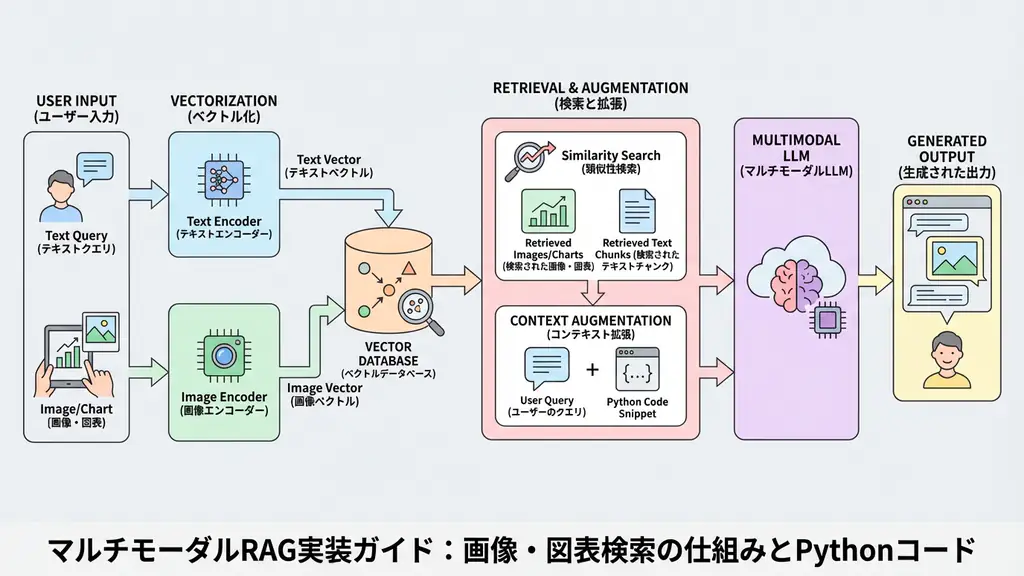
The multimodal RAG pipeline is configured by adding an “image processing path” to traditional text RAG. The following diagram shows its typical data flow:
The key to this architecture is “integrated search of text and images”. Rather than simply having separate indexes for text and images, they are stored in the same vector database or collections linked by metadata, allowing the LLM to integrate search results and generate answers.
When I actually design systems, I emphasize “metadata management”. Without maintaining context information about which page and section an image belonged to, the LLM cannot accurately determine “what this image represents.” Therefore, when vectorizing, adding the text before and after images (captions and surrounding explanations) as metadata is an essential technique for improving accuracy.
Implementation Example: Multimodal Search System with Python
Let’s look at a specific implementation. Here, we’ll build a flow using Python to extract images from PDFs, vectorize them using the CLIP model, and perform searches.
This code is just a prototype for verification, but it includes error handling and logging, providing a sufficient structure for engineers to understand the basics.
Prerequisites:
- Python 3.9+
- Required libraries:
langchain,chromadb,sentence-transformers,pdf2image,pillow
import logging
import os
import shutil
import tempfile
from pathlib import Path
from typing import List, Optional, Tuple

import chromadb
from pdf2image import convert_from_path
from PIL import Image
from sentence_transformers import SentenceTransformer, util

# Logging configuration
logging.basicConfig(
    level=logging.INFO,
    format="%(asctime)s - %(levelname)s - %(message)s"
)
logger = logging.getLogger(__name__)

class MultimodalRAG:
    def __init__(self, collection_name: str = "multimodal_docs"):
        """
        Initialize the multimodal RAG system.
        Set up the CLIP model and ChromaDB.
        """
        try:
            logger.info("Initializing model and database...")
            # Load CLIP model that can handle both images and text
            # For Japanese support, consider 'paraphrase-multilingual-clip-ViT-B-32' etc.
            self.model = SentenceTransformer('clip-ViT-B-32')
            logger.info(f"Model loading completed: {self.model}")

            # Set up ChromaDB (specify path for persistence)
            self.chroma_client = chromadb.Client()
            self.collection = self.chroma_client.get_or_create_collection(
                name=collection_name,
                metadata={"hnsw:space": "cosine"}
            )
            logger.info("Database connection completed")

        except Exception as e:
            logger.error(f"Error during initialization: {e}")
            raise

    def _extract_images_from_pdf(self, pdf_path: str) -> List[Tuple[Image.Image, int]]:
        """
        Helper method to extract images from PDF.
        Convert PDF to images page by page using pdf2image.
        *Ideally, use layout analysis library (Unstructured, etc.) to extract only chart parts,
         but here we simply treat entire pages as images.
        """
        images = []
        try:
            logger.info(f"Extracting images from PDF: {pdf_path}")
            # Convert PDF to image list
            pil_images = convert_from_path(pdf_path)

            for i, img in enumerate(pil_images):
                images.append((img, i + 1)) # (image object, page number)

            logger.info(f"Extracted {len(images)} page(s) of images")
            return images
        except Exception as e:
            logger.error(f"Image extraction error: {e}")
            return []

    def index_document(self, pdf_path: str, doc_id: str):
        """
        Index a document.
        Extract text and images, vectorize each, and save to DB.
        """
        if not os.path.exists(pdf_path):
            logger.error(f"File not found: {pdf_path}")
            return

        try:
            # 1. Image extraction and embedding
            images = self._extract_images_from_pdf(pdf_path)

            image_embeddings = []
            image_ids = []
            image_metadatas = []

            for img, page_num in images:
                # Temporarily save image to get path (for metadata)
                # In actual operation, store S3 storage path etc.
                temp_dir = tempfile.mkdtemp()
                img_path = os.path.join(temp_dir, f"page_{page_num}.png")
                img.save(img_path)

                # Generate image embedding
                emb = self.model.encode(img)
                image_embeddings.append(emb.tolist())
                image_ids.append(f"{doc_id}_img_page_{page_num}")
                image_metadatas.append({
                    "type": "image",
                    "source": pdf_path,
                    "page": page_num,
                    "doc_id": doc_id
                })

                # Cleanup
                shutil.rmtree(temp_dir)

            # 2. Text extraction and embedding (generate dummy text for simplification)
            # Actually extract text using PyPDF2 etc.
            text_chunks = [
                f"This is a text summary from page {i+1} of {pdf_path}."
                for i in range(len(images))
            ]

            text_embeddings = self.model.encode(text_chunks)
            text_ids = [f"{doc_id}_text_page_{i+1}" for i in range(len(text_chunks))]
            text_metadatas = [
                {"type": "text", "source": pdf_path, "page": i+1, "doc_id": doc_id}
                for i in range(len(text_chunks))
            ]

            # 3. Add to database
            if image_embeddings:
                self.collection.add(
                    ids=image_ids,
                    embeddings=image_embeddings,
                    metadatas=image_metadatas
                )

            if text_embeddings:
                self.collection.add(
                    ids=text_ids,
                    embeddings=text_embeddings,
                    metadatas=text_metadatas
                )

            logger.info(f"Document {doc_id} indexing completed")

        except Exception as e:
            logger.error(f"Unexpected error during indexing: {e}")
            raise

    def search(self, query: str, n_results: int = 3) -> dict:
        """
        Search for text and images related to the query.
        """
        try:
            logger.info(f"Executing search query: {query}")
            query_embedding = self.model.encode(query).tolist()

            results = self.collection.query(
                query_embeddings=[query_embedding],
                n_results=n_results
            )

            return results
        except Exception as e:
            logger.error(f"Error during search: {e}")
            return {}

# Execution example
if __name__ == "__main__":
    # Initialization
    rag = MultimodalRAG()

    # Dummy PDF file path (specify existing file in practice)
    # Here, assume non-existent path for error handling demonstration
    dummy_pdf_path = "sample_report.pdf"

    # Fallback processing if PDF doesn't exist (for demo)
    if not os.path.exists(dummy_pdf_path):
        logger.warning("Sample PDF not found. Skipping processing.")
        # Normally, create sample data here
    else:
        # Register document
        rag.index_document(dummy_pdf_path, doc_id="doc_001")

        # Execute search
        query = "Which pages have upward-trending graphs?"
        search_results = rag.search(query)

        logger.info(f"Search results: {search_results}")
The key point of this code is the use of SentenceTransformer('clip-ViT-B-32'). This model can encode both text and images, eliminating the need for separate models and simplifying implementation.
Regarding error handling, the code checks for file existence and catches exceptions during image processing to prevent unexpected system crashes. In production environments, more advanced layout analysis libraries (e.g., unstructured or marker) can be used instead of pdf2image to accurately extract only chart portions for vectorization, further improving search accuracy.
Business Use Case: Report Search for Securities Analysts
Let’s imagine a specific business scenario. Imagine a securities analyst at a brokerage firm. They read through earnings materials (PDFs) for hundreds of companies every day. These materials contain numerous line graphs showing sales trends and pie charts showing market share.
With traditional keyword search, they could search for the word “decrease” but couldn’t directly find downward-sloping graphs. However, by introducing multimodal RAG, analysts can now submit natural language queries like “Extract graphs of companies with declining profit margins in recent years.”
The system vectorizes the query intent (“declining,” “profit margins”) and rapidly compares it with tens of thousands of graph images in the database. As a result, subtle trends not explicitly stated in text and visual insights shown only in charts can be discovered much faster than human visual inspection. This promises clear ROI (return on investment) through reduced research time and improved analysis comprehensiveness.
Frequently Asked Questions
Q: What is the biggest difference between multimodal RAG and traditional RAG? A: While traditional RAG only handles text information, multimodal RAG can search and understand visual information such as images, charts, and graphs in the same vector space as text. This enables question answering for visual elements within documents.
Q: Which part of the implementation requires the most computational cost? A: The image vectorization (embedding) process. Especially when processing high-resolution images or PDFs with many pages, GPU resources are often required, and processing time tends to be longer compared to text-only processing.
Q: In what business scenarios does it demonstrate effectiveness? A: It demonstrates great effectiveness in document-intensive tasks where text alone is insufficient, such as equipment drawing search in manufacturing, analysis of financial earnings materials (including graphs), and collation of medical reports and images.
Summary
- Multimodal RAG enables document search including images and charts, utilizing visual information that was often overlooked in traditional text-only RAG.
- By leveraging models like CLIP to place text and images in a common vector space, semantic cross-search is realized.
- Implementation requires appropriate error handling and library selection in each step of image extraction, vectorization, and metadata management.
- It has the potential to dramatically improve operational efficiency in business scenarios where visual information plays an important role, such as securities analysis and manufacturing manual search.
Recommended Resources
- Book: “Building Vector Search Applications: AI Architecture with Open-Source Tools”
- Explains everything from vector search basics to applications in detail from an architectural design perspective.
- Tool: LlamaIndex
- Rich in modules for building multimodal RAG, from data loading (LlamaParse) to indexing and search.
AI Implementation Support & Development Consulting
We provide design and development support for AI solutions optimal for your business processes. If you’re considering introducing multimodal RAG, please contact us through the form below.
References
[1] OpenAI CLIP: Connecting Text and Images https://openai.com/research/clip [2] Sentence-Transformers Documentation https://www.sbert.net/ [3] ChromaDB Documentation https://docs.trychroma.com/