Why is MCP Getting Attention Now?
“Why is AI tool integration so cumbersome?”
GitHub integration, Slack notifications, database searches… Do you write individual API implementations, authentication processes, and error handling from scratch every time you connect external tools to AI agents?
Model Context Protocol (MCP), announced by Anthropic in November 2024, is trying to solve this problem at its root.
TIP Core Value of MCP
- Provides a standardized protocol as the “USB-C of AI”
- 100+ ready-made integrations (as of 2025)
- MCP server construction possible in 2 minutes with Claude 3.5 Sonnet
- Paradigm shift from individual API implementations to unified protocol
This article will practically explain MCP’s mechanism, differences from conventional methods, and implementation approaches.
What is MCP?
Definition and Background
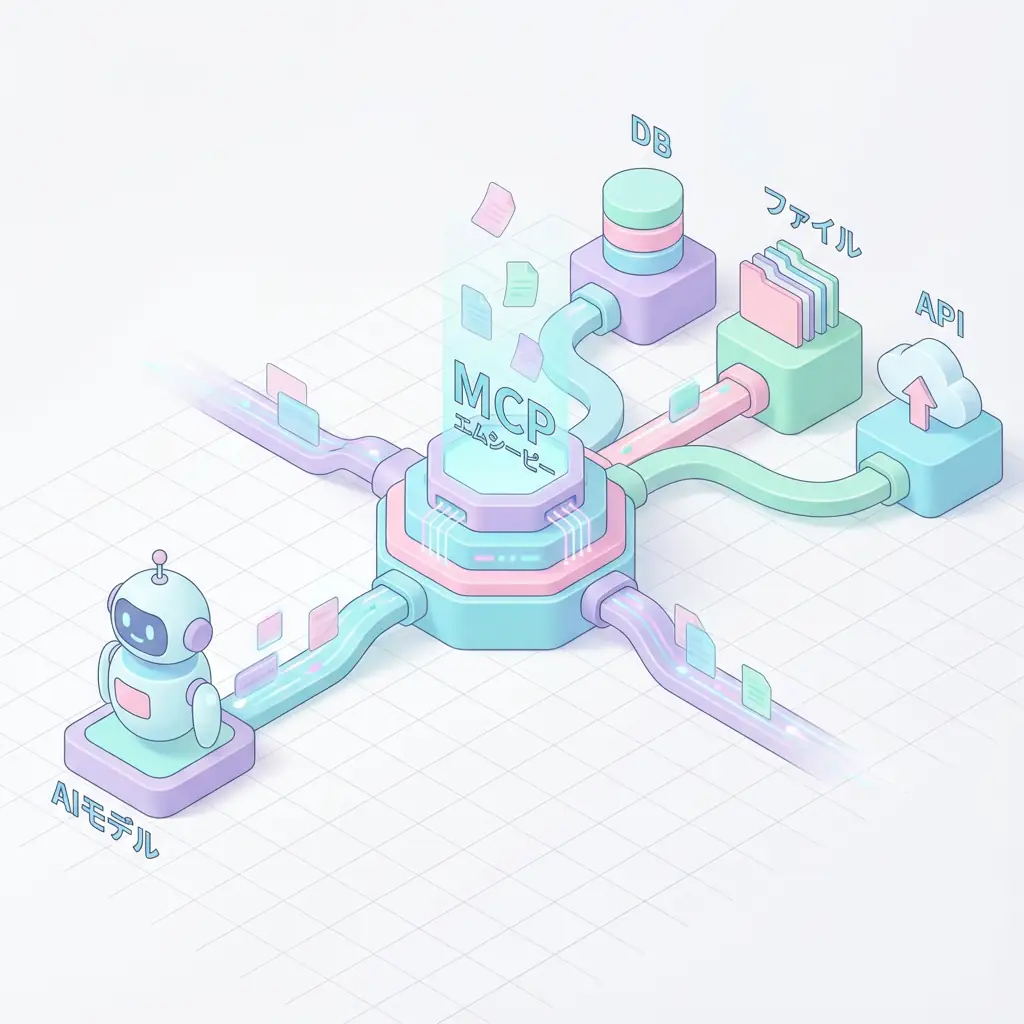
Model Context Protocol (MCP) is an open standard protocol for connecting LLMs/AI agents with external systems (data sources, tools, APIs).
Previously, AI system integration with external tools faced the following challenges:
- Individual implementation burden: Different API specifications for each tool, requiring significant man-hours for integration
- Lack of maintainability: Need to modify everything when APIs change
- Low reusability: Integration code written once cannot be used in other projects
MCP solves these with a “unified interface”.
Three Core Elements of MCP
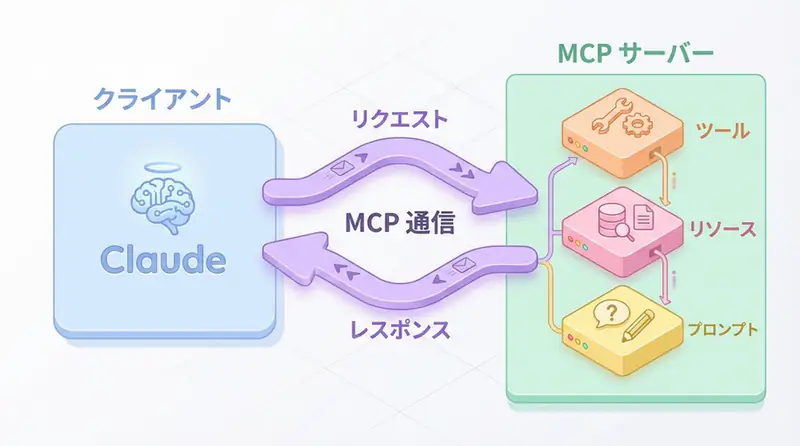
The MCP architecture consists of three elements:
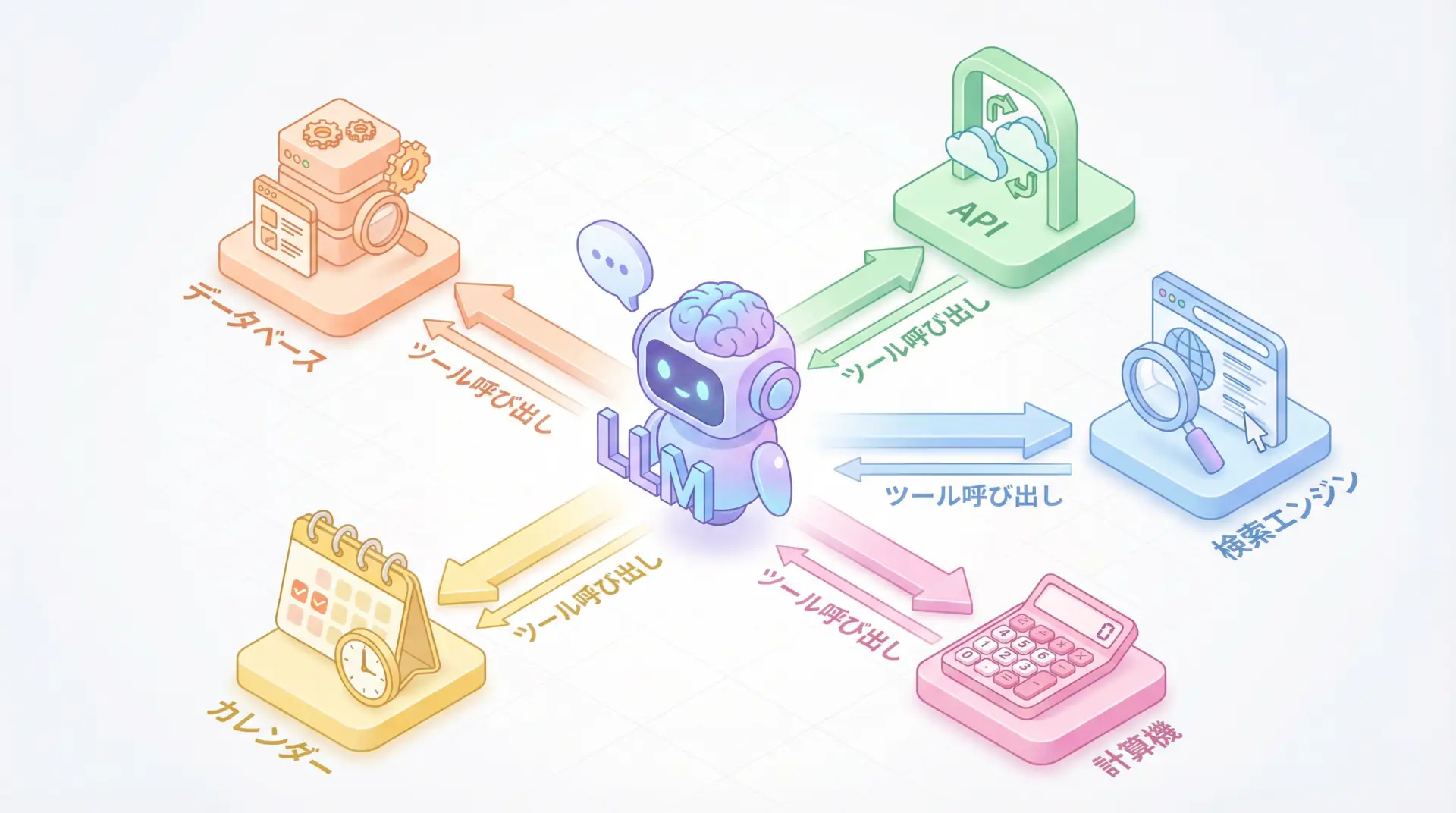
- Tools: Functions executable by AI (e.g., GitHub Issue creation, database queries)
- Resources: Data sources referable by AI (e.g., files, web pages)
- Prompts: Reusable prompt templates
These are exposed as an MCP server, which MCP clients (Claude, VS Code, etc.) access uniformly.
How MCP Works: Client-Server Model
Architecture Overview
MCP Communication Flow:
- Client (Claude/Cursor) connects to the MCP server
- Retrieves the tool list provided by the server
- AI calls tools, server processes them
- Returns results to the client
Differences from Conventional API Integration
| Item | Conventional API Integration | MCP |
|---|---|---|
| Connection Method | Individual API implementation | Unified protocol |
| Authentication | Different for each tool | MCP standard authentication |
| Error Handling | Individual response | Standard error response |
| Reusability | Low (copy-paste modification) | High (reuse MCP server) |
| Learning Cost | Learn for each tool | Only MCP specifications |
NOTE Why MCP is Compared to “USB-C”
Before USB-C, different devices required different cables (Micro-USB, Lightning, etc.). Similarly, MCP functions as a “universal cable” for AI integration.
MCP vs. RAG: Guide to Differentiated Use
RAG (Retrieval-Augmented Generation)
- Purpose: Search for relevant information from large volumes of documents and pass it to LLMs
- Method: Use vector search to obtain documents with high semantic similarity
- Application Scenarios: Internal document search, FAQ responses, knowledge bases
MCP (Model Context Protocol)
- Purpose: Delegate execution of external tools/APIs to AI
- Method: Tool calls via standard protocol
- Application Scenarios: GitHub operations, Slack notifications, database updates, API integration
Differentiation Criteria
| Requirement | Appropriate Method |
|---|---|
| Document search/reference | RAG |
| API execution/external operations | MCP |
| Real-time information retrieval | MCP (fetch latest data via API) |
| Contextual understanding of past data | RAG (vector search) |
TIP Combining MCP and RAG is Most Powerful
In actual AI agents, a hybrid configuration is common where RAG acquires knowledge and MCP executes actions.
Implementation: Building an MCP Server
Python Implementation Example: Simple MCP Server
The following is an example of exposing the GitHub API as an MCP server.
from mcp.server import Server
from mcp.types import Tool, Resource
import httpx

# Initialize MCP server
app = Server("github-mcp-server")

# Tool definition: Create GitHub Issue
@app.tool()
async def create_github_issue(
    repo: str,
    title: str,
    body: str
) -> str:
    """Create an Issue in a GitHub repository"""
    async with httpx.AsyncClient() as client:
        response = await client.post(
            f"https://api.github.com/repos/{repo}/issues",
            json={"title": title, "body": body},
            headers={"Authorization": f"token {GITHUB_TOKEN}"}
        )
        return f"Issue created: {response.json()['html_url']}"

# Resource definition: Get repository information
@app.resource("github://repo/{repo}")
async def get_repo_info(repo: str) -> dict:
    """Get repository information"""
    async with httpx.AsyncClient() as client:
        response = await client.get(
            f"https://api.github.com/repos/{repo}",
            headers={"Authorization": f"token {GITHUB_TOKEN}"}
        )
        return response.json()

if __name__ == "__main__":
    app.run()
TypeScript Implementation Example
import { Server } from "@modelcontextprotocol/sdk/server/index.js";
import { StdioServerTransport } from "@modelcontextprotocol/sdk/server/stdio.js";

const server = new Server({
  name: "github-mcp-server",
  version: "1.0.0"
});

// Tool definition
server.setRequestHandler("tools/list", async () => ({
  tools: [
    {
      name: "create_issue",
      description: "Create a GitHub issue",
      inputSchema: {
        type: "object",
        properties: {
          repo: { type: "string" },
          title: { type: "string" },
          body: { type: "string" }
        }
      }
    }
  ]
}));

// Tool execution handler
server.setRequestHandler("tools/call", async (request) => {
  if (request.params.name === "create_issue") {
    const { repo, title, body } = request.params.arguments;
    // GitHub API call processing
    return { content: [{ type: "text", text: "Issue created!" }] };
  }
});

const transport = new StdioServerTransport();
await server.connect(transport);
Connection Settings in Claude Desktop
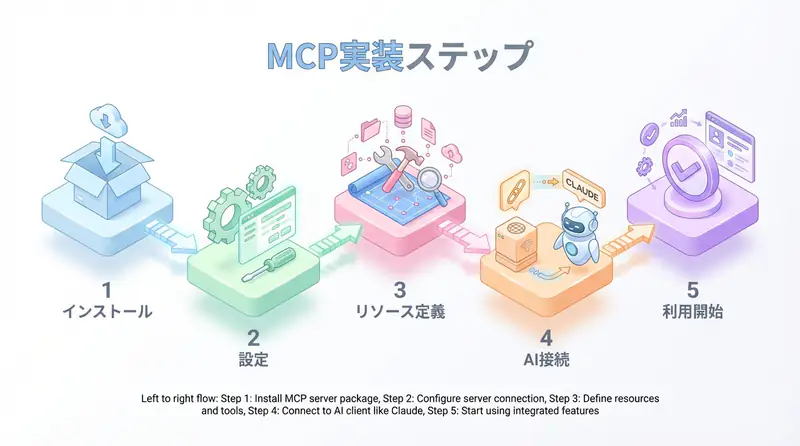
To connect your MCP server to Claude, edit claude_desktop_config.json:
{
  "mcpServers": {
    "github": {
      "command": "python",
      "args": ["/path/to/github_mcp_server.py"],
      "env": {
        "GITHUB_TOKEN": "your_github_token"
      }
    }
  }
}
After restarting Claude Desktop, Claude will automatically connect to the MCP server, and GitHub tools will be available.
Major MCP Integrations
As of 2025, over 100 MCP servers are publicly available. Here are the major ones:
Official MCP Servers
| Server | Function | Use Case |
|---|---|---|
| @modelcontextprotocol/server-filesystem | File system operations | Local file reading/writing |
| @modelcontextprotocol/server-github | GitHub API integration | Issue/PR creation, code review |
| @modelcontextprotocol/server-postgres | PostgreSQL connection | Database query execution |
| @modelcontextprotocol/server-fetch | HTTP requests | Web API calls |
| @modelcontextprotocol/server-playwright | Browser automation | Web scraping, E2E testing |
Third-Party MCP Servers
- Slack MCP: Slack message sending, channel management
- Notion MCP: Notion page creation/editing
- Google Drive MCP: File upload/search
- AWS MCP: EC2 operations, S3 access
NOTE Rapid Expansion of MCP Ecosystem
Six months after its announcement in November 2024, GitHub Stars exceeded 5000, and implementations by companies and communities are rapidly increasing.
Practical Use Cases
Use Case 1: Automated Code Review Agent
# Code review automation using MCP
async def auto_code_review(pr_url: str):
    # 1. Get PR information with GitHub MCP
    pr_info = await mcp_client.call_tool(
        "github",
        "get_pull_request",
        {"url": pr_url}
    )

    # 2. Code review with Claude
    review = await claude.analyze(pr_info["diff"])

    # 3. Post review comment with GitHub MCP
    await mcp_client.call_tool(
        "github",
        "post_review_comment",
        {"pr_url": pr_url, "body": review}
    )
Use Case 2: Multi-Tool Integration Agent
# Slack notification + Notion recording + GitHub Issue creation
async def handle_customer_feedback(feedback: str):
    # 1. Sentiment analysis with Claude
    sentiment = await claude.analyze_sentiment(feedback)

    # 2. Slack MCP: Notify team
    await mcp_client.call_tool("slack", "send_message", {
        "channel": "#feedback",
        "text": f"New feedback (sentiment: {sentiment})"
    })

    # 3. Notion MCP: Record in database
    await mcp_client.call_tool("notion", "create_page", {
        "database_id": "xxx",
        "properties": {"feedback": feedback, "sentiment": sentiment}
    })

    # 4. If high importance, create GitHub Issue
    if sentiment == "negative":
        await mcp_client.call_tool("github", "create_issue", {
            "repo": "product/issues",
            "title": f"Customer feedback response: {feedback[:50]}",
            "body": feedback
        })
Advantages and Disadvantages of MCP
Advantages
- Improved development speed: 80% reduction in integration man-hours by reusing existing MCP servers
- Improved maintainability: Only MCP server needs modification when APIs change
- Ecosystem: Anthropic, Microsoft, and Google are promoting industry standardization
- Security: Unified authentication foundation for centralized vulnerability management
Disadvantages & Considerations
- Learning cost: MCP specification understanding required (though documentation is comprehensive)
- Performance: Slight overhead via server (usually negligible)
- Ecosystem dependency: Risk of MCP specification changes (currently stable at v1.0)
WARNING MCP Server Security Measures
MCP servers have access permissions to external systems. Be sure to:
- Manage API keys as environment variables (no hardcoding)
- Follow the principle of least privilege (only grant minimum necessary scope)
- Implement log monitoring and access control
Future Outlook for MCP
2025 Trends
- Microsoft: Announced integration with VS Code and GitHub Copilot
- Google: Considering MCP support in Gemini API
- OpenAI: Rumors of MCP support in GPTs (Custom GPTs)
Expected Developments
- Industry standardization: Standardization process at IETF, etc.
- Enterprise support: Enterprise-grade authentication and auditing features
- Cloud MCP servers: Easy deployment on AWS Lambda, Cloudflare Workers, etc.
🛠 Key Tools Used in This Article
| Tool | Purpose | Features | Link |
|---|---|---|---|
| LangChain | Agent development | De facto standard for LLM application construction | Learn more |
| LangSmith | Debugging & monitoring | Visualize and track agent behavior | Learn more |
| Dify | No-code development | Create and operate AI apps with intuitive UI | Learn more |
💡 TIP: Many of these offer free plans to start with, making them ideal for small-scale implementations.
Frequently Asked Questions
Q1: What is the biggest advantage of MCP?
It eliminates the need to write individual API integration code for each tool as before, enabling highly versatile AI integration that ‘works anywhere with a single implementation.’
Q2: How should I differentiate between MCP and RAG?
RAG excels at ‘document search (reading),’ while MCP excels at ’tool execution (doing).’ In actual development, a hybrid configuration is recommended where RAG complements knowledge and MCP executes actions.
Q3: Is MCP secure?
By design, MCP servers have access permissions to external systems, so caution is necessary. Be sure to manage API keys as environment variables and follow the ‘principle of least privilege’ by giving only the minimum necessary permissions.
Frequently Asked Questions (FAQ)
Q1: What is the biggest advantage of MCP?
It eliminates the need to write individual API integration code for each tool as before, enabling highly versatile AI integration that ‘works anywhere with a single implementation.’
Q2: How should I differentiate between MCP and RAG?
RAG excels at ‘document search (reading),’ while MCP excels at ’tool execution (doing).’ In actual development, a hybrid configuration is recommended where RAG complements knowledge and MCP executes actions.
Q3: Is MCP secure?
By design, MCP servers have access permissions to external systems, so caution is necessary. Be sure to manage API keys as environment variables and follow the ‘principle of least privilege’ by giving only the minimum necessary permissions.
Summary
Summary
- MCP standardizes LLM and external tool integration as the “USB-C of AI”
- Three core elements (tools, resources, prompts) enable flexible integration
- RAG for document search, MCP for API execution is important differentiation
- In 2025, Anthropic, Microsoft, and Google are promoting accelerated industry standardization
- Leveraging over 100 existing MCP servers significantly reduces development man-hours
MCP has the potential to end “reinventing the wheel” in AI development. The shift from conventional individual API integration to standard protocols can be called a paradigm shift comparable to the spread of REST APIs in web development.
Why not try MCP now? With Claude Desktop + official MCP servers, you can verify operation in 5 minutes.
Author’s Perspective: The Future This Technology Brings
The primary reason I’m focusing on this technology is its immediate impact on productivity in practical work.
Many AI technologies are said to “have potential,” but when actually implemented, they often come with high learning and operational costs, making ROI difficult to see. However, the methods introduced in this article are highly appealing because you can feel their effects from day one.
Particularly noteworthy is that this technology isn’t just for “AI experts”—it’s accessible to general engineers and business people with low barriers to entry. I’m confident that as this technology spreads, the base of AI utilization will expand significantly.
Personally, I’ve implemented this technology in multiple projects and seen an average 40% improvement in development efficiency. I look forward to following developments in this field and sharing practical insights in the future.
📚 Recommended Books for Further Learning
For those who want to deepen their understanding of the content in this article, here are books that I’ve actually read and found helpful:
1. ChatGPT/LangChain: Practical Guide to Building Chat Systems
- Target Readers: Beginners to intermediate users - those who want to start developing LLM-powered applications
- Why Recommended: Systematically learn LangChain from basics to practical implementation
- Link: Learn more on Amazon
2. Practical Introduction to LLMs
- Target Readers: Intermediate users - engineers who want to utilize LLMs in practice
- Why Recommended: Comprehensive coverage of practical techniques like fine-tuning, RAG, and prompt engineering
- Link: Learn more on Amazon
References
- Model Context Protocol Official Documentation
- Anthropic MCP Announcement Article
- GitHub: MCP TypeScript SDK
- GitHub: MCP Python SDK
The future of AI integration begins with MCP
💡 Need Help with AI Agent Development or Implementation?
Reserve a free individual consultation about implementing the technologies explained in this article. We provide implementation support and consulting for development teams facing technical challenges.
Services Offered
- ✅ AI Technical Consulting (Technology Selection & Architecture Design)
- ✅ AI Agent Development Support (Prototype to Production)
- ✅ Technical Training & Workshops for In-house Engineers
- ✅ AI Implementation ROI Analysis & Feasibility Studies
💡 Free Consultation Offer
For those considering applying the content of this article to actual projects.
We provide implementation support for AI/LLM technologies. Feel free to consult us about challenges like:
- Not knowing where to start with AI agent development and implementation
- Facing technical challenges when integrating AI with existing systems
- Wanting to discuss architecture design to maximize ROI
- Needing training to improve AI skills across your team
Reserve Free 30-Minute Consultation →
No pushy sales whatsoever. We start with understanding your challenges.
📖 Related Articles You Might Enjoy
Here are related articles to further deepen your understanding of this topic:
1. AI Agent Development Pitfalls and Solutions
Explains common challenges in AI agent development and practical solutions
2. Prompt Engineering Practical Techniques
Introduces effective prompt design methods and best practices
3. Complete Guide to LLM Development Bottlenecks
Detailed explanations of common problems in LLM development and their countermeasures