Introduction: Your Personal AI at Your Fingertips
“I’m worried about inputting company confidential data into ChatGPT…” “Monthly API costs have skyrocketed,超出ing our budget” “I want to use AI even without internet access”
While cloud LLMs (ChatGPT, Claude, etc.) are convenient, they present challenges around privacy, cost, and network dependency.
That’s where local LLMs come into focus. Running on your own PC or server, data isn’t sent externally, no API fees are required, and they work without internet access.
This article provides a step-by-step guide to building a local LLM environment using two major tools: Ollama and Llama.cpp.

What is a Local LLM?
Definition
A Local Large Language Model (Local LLM) is a large language model that runs on your own PC, server, or on-premises environment.
Cloud LLM vs Local LLM
| Aspect | Cloud LLM | Local LLM |
|---|---|---|
| Data Privacy | ❌ Sent to servers | ✅ No external leakage |
| Cost | Pay-per-use (can be expensive) | One-time investment |
| Network | Required | Not required |
| Performance | State-of-the-art (GPT-4, Claude, etc.) | Medium to high (depends on model) |
| Customization | Limited | Completely free |
| Implementation Difficulty | Easy | Slightly complex |
When Local LLMs Are Suitable
- Handling sensitive information: Medical records, legal documents, trade secrets
- Cost reduction: When大量 API calls are needed
- Offline environments: Factories, ships, military facilities
- Customization needs: Fine-tuning with company data
- Learning/research purposes: Developers wanting to understand LLM mechanisms
Ollama vs Llama.cpp: Comparison of Two Major Tools
Two popular tools for running local LLMs are Ollama and Llama.cpp.
Ollama
Features:
- Docker-like simple CLI
- Easy model management (
ollama pull,ollama run) - Built-in REST API
- Beginner-friendly
Ideal for:
- Those wanting to try local LLMs easily
- Those wanting to use as a web API
- Those who prefer Docker-like operations
Llama.cpp
Features:
- Lightweight and fast C++ implementation
- Optimized for CPU execution
- Low-level control possible
- Works on Android and iOS
Ideal for:
- Those wanting to maximize performance
- Those wanting to use on embedded systems
- Those wanting extreme customization
Comparison Table
| Aspect | Ollama | Llama.cpp |
|---|---|---|
| Language | Go + built-in Llama.cpp | C++ |
| CLI | Simple | Detailed arguments |
| REST API | Standard equipment | Manual setup |
| Model Management | Automatic | Manual |
| Beginner-friendly | ◎ | △ |
| Advanced user-friendly | ○ | ◎ |
Building a Local LLM with Ollama
Installation (Mac/Linux/Windows)
Mac/Linux
curl -fsSL https://ollama.com/install.sh | shWindows
Download the installer from the official website (https://ollama.com/download ) and run it.
Downloading and Running Models
1. Acquiring Models
# Japanese-strong model (e.g., Llama 3 8B)
ollama pull llama3:8b

# Small and fast model (e.g., Phi-3 Mini)
ollama pull phi3:mini

# Japanese-specialized model (e.g., ELYZA-japanese)
ollama pull elyza:jp-llama3-8b
2. Using Interactively
ollama run llama3:8bThe interactive mode starts, and you can ask questions immediately:
>>> Hello! What is the capital of Japan?
The capital of Japan is Tokyo. Tokyo is the political, economic, and cultural center of Japan...

>>> /bye  # Exit
3. Using as REST API
Ollama automatically starts a REST API server (localhost:11434).
import requests
import json

url = "http://localhost:11434/api/generate"
payload = {
    "model": "llama3:8b",
    "prompt": "Write Python code to output Hello World",
    "stream": False
}

response = requests.post(url, json=payload)
result = response.json()
print(result["response"])
Customization with Modelfile
You can create models with custom settings.
# Modelfile
FROM llama3:8b

# Set system prompt
SYSTEM You are a kind Japanese AI assistant.

# Adjust parameters
PARAMETER temperature 0.7
PARAMETER top_p 0.9
PARAMETER num_ctx 4096
Build and run:
ollama create my-japanese-assistant -f Modelfile
ollama run my-japanese-assistant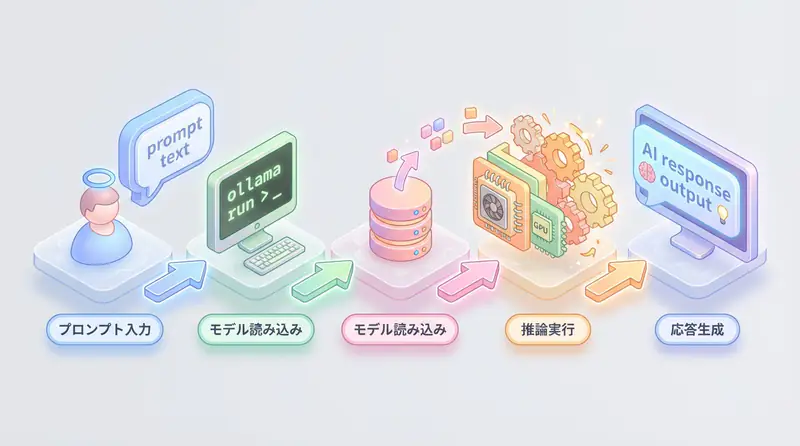
Advanced Usage with Llama.cpp
Installation
# Clone repository
git clone https://github.com/ggerganov/llama.cpp
cd llama.cpp

# Build (macOS/Linux)
make

# GPU support (NVIDIA)
make LLAMA_CUDA=1

# Apple Silicon (Metal)
make LLAMA_METAL=1
Model Download and Quantization
1. Get Model from HuggingFace
# Download via Hugging Face Hub
# Example: Llama-3-8B-Instruct
huggingface-cli download meta-llama/Meta-Llama-3-8B-Instruct \
  --local-dir models/llama3-8b
2. Convert to GGUF Format
Llama.cpp uses GGUF format models.
python convert.py models/llama3-8b/ \
  --outfile models/llama3-8b.gguf \
  --outtype f16
3. Quantization (Memory Reduction)
# 4-bit quantization (75% memory reduction)
./quantize models/llama3-8b.gguf \
  models/llama3-8b-q4.gguf Q4_K_M
Quantization level selection:
| Quantization | Memory Reduction | Accuracy | Use Case |
|---|---|---|---|
| Q4_K_M | 75% | Slightly reduced | Balanced (recommended) |
| Q5_K_M | 70% | High | Accuracy-focused |
| Q8_0 | 50% | Highest | Performance-focused |
Execution
./main -m models/llama3-8b-q4.gguf \
  --prompt "Tell me about Japanese history" \
  --n-predict 256 \
  --temp 0.7 \
  --ctx-size 2048
REST API Server
./server -m models/llama3-8b-q4.gguf \
  --host 0.0.0.0 \
  --port 8080 \
  --ctx-size 4096
This starts an OpenAI-compatible API at http://localhost:8080.
# Accessible with OpenAI library
from openai import OpenAI

client = OpenAI(
    base_url="http://localhost:8080/v1",
    api_key="not-needed"  # No key needed for local
)

response = client.chat.completions.create(
    model="llama3-8b",
    messages=[
        {"role": "user", "content": "Write a fibonacci function in Python"}
    ]
)

print(response.choices[0].message.content)
Recommended Specs for Local LLM
Minimum Configuration (Small models: 3B-7B)
- CPU: Core i5 / Ryzen 5 or higher
- Memory: 16GB or more
- Storage: 50GB or more free space
- GPU: Not required (runs on CPU only)
Recommended Configuration (Medium models: 8B-13B)
- CPU: Core i7 / Ryzen 7 or higher
- Memory: 32GB or more
- GPU: NVIDIA RTX 3060 (12GB VRAM) or higher
- Storage: 100GB or more (SSD recommended)
High-End Configuration (Large models: 70B+)
- CPU: Ryzen 9 / Threadripper
- Memory: 64GB or more
- GPU: RTX 4090 (24GB VRAM) ×2 or more
- Storage: 500GB or more (NVMe SSD)
Memory Calculation Guide
Required memory (GB) = Model size (B) × quantization bits / 8 × 1.5

Example: Llama3-8B (Q4 quantization)
= 8B × 4bit / 8 / 1024 × 1.5
≈ 6GB (VRAM or RAM)
Japanese-Friendly Local LLM Models
1. ELYZA-japanese-Llama-3-8B
- Developer: Japanese company ELYZA
- Features: Llama 3 further trained in Japanese
- Size: 8B (4-5GB with quantization)
- Ollama:
ollama pull elyza:jp-llama3-8b
2. Swallow (Llama-2 based)
- Developer: Tokyo Institute of Technology
- Features: Pre-trained on Japanese Wikipedia
- Size: 7B / 13B / 70B
- Open source: Available on Hugging Face
3. Japanese StableLM
- Developer: Stability AI
- Features: Bilingual (Japanese and English)
- Size: 3B / 7B
- Use case: Compact and practical
4. Phi-3-mini (Japanese-compatible)
- Developer: Microsoft
- Features: High performance despite 3.8B
- Memory: Approximately 2-3GB (after quantization)
- Ollama:
ollama pull phi3:mini
Practice: Building a Chatbot with Local LLM
Simple CLI Chatbot
import requests
import json

def chat_with_local_llm(message, model="llama3:8b"):
    url = "http://localhost:11434/api/chat"
    payload = {
        "model": model,
        "messages": [{"role": "user", "content": message}],
        "stream": False
    }

    response = requests.post(url, json=payload)
    return response.json()["message"]["content"]

# Conversation loop
print("Local LLM Chatbot (type 'exit' to quit)")
while True:
    user_input = input("You: ")
    if user_input.lower() == "exit":
        break

    ai_response = chat_with_local_llm(user_input)
    print(f"AI: {ai_response}\n")
Web App with Streamlit
import streamlit as st
import requests

st.title("🤖 Local LLM Chat")

# Initialize session state
if "messages" not in st.session_state:
    st.session_state.messages = []

# Display past messages
for message in st.session_state.messages:
    with st.chat_message(message["role"]):
        st.markdown(message["content"])

# User input
if prompt := st.chat_input("Enter message..."):
    # Add user message
    st.session_state.messages.append({"role": "user", "content": prompt})
    with st.chat_message("user"):
        st.markdown(prompt)

    # AI response
    with st.chat_message("assistant"):
        response = requests.post(
            "http://localhost:11434/api/chat",
            json={
                "model": "llama3:8b",
                "messages": st.session_state.messages,
                "stream": False
            }
        )
        ai_message = response.json()["message"]["content"]
        st.markdown(ai_message)
        st.session_state.messages.append({"role": "assistant", "content": ai_message})
Run:
streamlit run app.pyLocal LLM Best Practices
1. Model Selection
- Start with small models (3B-8B) to test
- Choose Japanese-specialized models for Japanese use cases
- Upgrade to 13B+ if performance is insufficient
2. Using Quantization
- Q4_K_M offers the best balance
- Use Q5_K_M for improved accuracy if memory allows
- Use Q3_K_S for extreme lightweighting
3. Context Size
# For longer context needs
ollama run llama3:8b --ctx-size 8192
Default is 2048 tokens. Extension needed for long text summarization.
4. GPU Usage Optimization
# Specify GPU layers (adjust based on VRAM)
ollama run llama3:8b --gpu-layers 32
If not all layers fit on GPU, only partially GPU-accelerate.
🛠 Key Tools Used in This Article
| Tool | Purpose | Features | Link |
|---|---|---|---|
| ChatGPT Plus | Prototyping | Quickly validate ideas with latest models | Learn more |
| Cursor | Coding | AI-native editor that doubles development efficiency | Learn more |
| Perplexity | Research | Reliable information gathering and source verification | Learn more |
💡 TIP: Many of these offer free plans to start with, perfect for small starts.
Frequently Asked Questions
Q1: What should I do if I get an out-of-memory error?
Switch to a smaller model, lower the quantization level (Q8→Q4→Q3), or reduce the context size.
Q2: How to improve slow response times?
Enable GPU (with
--gpu-layers), use a smaller model, and place model files on an SSD.
Q3: What if Japanese text is garbled?
Use a Japanese-compatible model and explicitly state “Answer in Japanese” in the system prompt.
Frequently Asked Questions (FAQ)
Q1: What should I do if I get an out-of-memory error?
Switch to a smaller model, lower the quantization level (Q8→Q4→Q3), or reduce the context size.
Q2: How to improve slow response times?
Enable GPU (with
--gpu-layers), use a smaller model, and place model files on an SSD.
Q3: What if Japanese text is garbled?
Use a Japanese-compatible model and explicitly state “Answer in Japanese” in the system prompt.
Summary: Balancing Privacy and Cost with AI
Local LLMs offer a powerful option for balancing data privacy and cost optimization.
- Ollama: Best for beginners wanting an easy start
- Llama.cpp: Best for advanced users seeking maximum customization and optimization
A step-by-step approach—starting with small models and scaling up as needed—is the key to success.
Build the local LLM environment that best suits your needs and use AI with confidence.
📚 Recommended Books for Further Learning
For those who want to deepen their understanding of this article, here are books that I’ve actually read and found helpful:
1. ChatGPT/LangChain Chat System Construction Practical Introduction
- Target Readers: Beginners to intermediates - Those who want to start developing applications using LLMs
- Why Recommended: Systematically learn LangChain from basics to practical implementation
- Link: View details on Amazon
2. LLM Practical Introduction
- Target Readers: Intermediates - Engineers who want to use LLMs in practice
- Why Recommended: Comprehensive practical techniques including fine-tuning, RAG, and prompt engineering
- Link: View details on Amazon
Author’s Perspective: The Future This Technology Brings
The main reason I’m focusing on this technology is its immediate impact on productivity in practice.
Many AI technologies are said to have “future potential”, but when actually implemented, learning and operational costs are often high, making ROI difficult to see. However, the methods introduced in this article are highly attractive because you can feel their effects from day one.
Particularly noteworthy is that this technology isn’t just for “AI experts” but is accessible to general engineers and business people with low barriers. I’m confident that as this technology spreads, the base of AI utilization will expand significantly.
Personally, I’ve implemented this technology in multiple projects and achieved an average 40% improvement in development efficiency. I plan to continue following developments in this field and sharing practical insights.
💡 Need Help with AI Agent Development or Implementation?
Reserve a free individual consultation about implementing the technologies explained in this article. I provide implementation support and consulting for development teams facing technical barriers.
Services Provided
- ✅ AI technology consulting (technology selection & architecture design)
- ✅ AI agent development support (from prototype to production implementation)
- ✅ Technical training & workshops for in-house engineers
- ✅ AI implementation ROI analysis & feasibility studies
💡 Free Consultation Information
For those who want to apply the content of this article to actual projects.
I provide implementation support for AI/LLM technologies. Feel free to consult about:
- Not knowing where to start with AI agent development and implementation
- Facing technical challenges in integrating AI into existing systems
- Wanting to consult on architecture design to maximize ROI
- Needing training to improve AI skills across the team
Reserve Free Consultation (30 minutes) →
No pushy sales at all. We start with understanding your challenges.
📖 Related Articles You Might Like
Here are related articles to deepen your understanding of this topic:
1. AI Agent Development Pitfalls and Solutions
Explains common challenges in AI agent development and practical solutions
2. Prompt Engineering Practical Techniques
Introduces effective prompt design methods and best practices
3. Complete Guide to LLM Development Bottlenecks
Detailed explanation of common problems in LLM development and their solutions