Introduction: The Essential Limitations of Vector Search
When I support projects that utilize LLMs for business, the first solution considered is Retrieval-Augmented Generation (RAG). The pattern of vectorizing documents, searching for chunks similar to the query, and feeding them as context is easy to implement and provides immediate results.
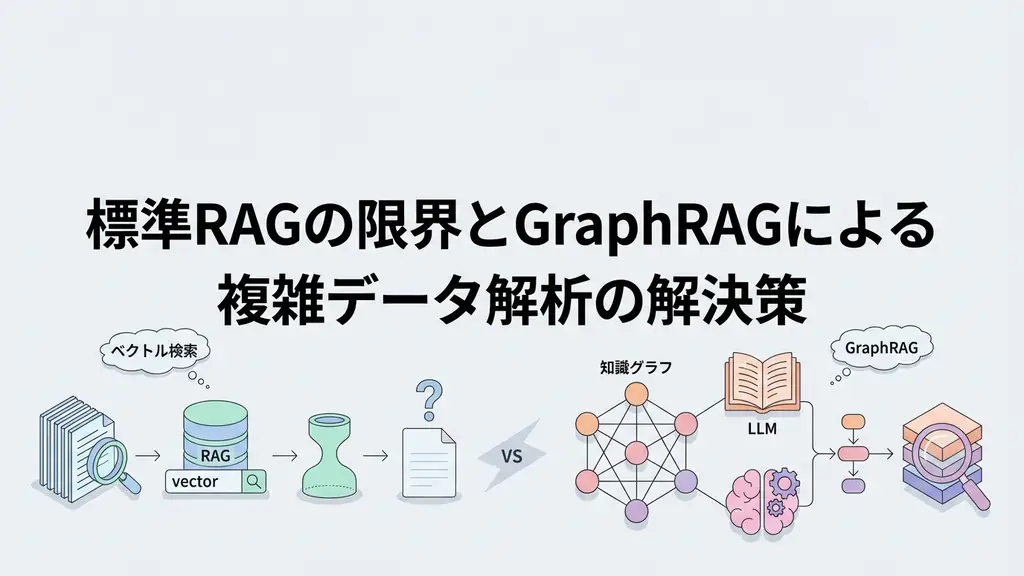
However, after implementing GraphRAG, I became acutely aware of its limitations. Standard RAG can only respond to “small fragmentary questions.”
Let’s take an example. Imagine you’re the head of an information systems department in a company with hundreds of internal documents. When faced with a question like “What concepts were frequently cited as technical challenges in the previous three quarters of projects?”, how would standard RAG behave?
It might find places where those concepts are mentioned in each document, but it lacks the ability to summarize overall trends. It cannot track relationships between documents and can only process information at the isolated chunk level. This “global understanding problem” is the essential constraint of standard RAG.
In this article, I’ll explain the architecture, internal workings, and implementation methods of GraphRAG, which solves this problem, while incorporating insights from my actual experience.
Limitations of Standard RAG: The Barrier to Global Understanding
The standard RAG pipeline can be organized as follows:
- Split documents into chunks
- Vectorize each chunk with an Embedding model
- Search for relevant chunks based on similarity between query embeddings and document embeddings
- Include the extracted chunks in prompts and generate answers with LLM
The biggest problem with this flow is that “search” and “answer generation” are completed in a single pass. The LLM receives only chunks highly relevant to the query and attempts to answer only within that scope.
This results in three main problems.
First: Lack of Topical Breadth
For a question like “Tell me about success factors for machine learning projects,” standard RAG only searches for documents that contain the phrase “success factors.” However, documents that discuss success factors indirectly as “lessons” or “challenges” are ignored. Without capturing topic expansion, answers tend to be fragmentary.
Second: Lack of Inter-document Relationships
With hundreds of documents, standard RAG cannot grasp how documents relate to each other or what higher-level concepts they can be grouped under. For example, even if “Kubernetes,” “Docker,” and “CI/CD” are discussed in separate documents, it cannot understand that they belong to the higher-level concept of “container orchestration.”
Third: Difficulty Handling Complex Questions
For multi-layered questions like “What values characterize this company culture and what specific business decisions are related to them?”, standard RAG cannot sufficiently search for the necessary information.
To address these limitations, Microsoft Research developed GraphRAG. I’m confident that this technology enables deep understanding that traditional RAG couldn’t capture.
GraphRAG Architecture: Knowledge Graph for Global Understanding
GraphRAG adds a knowledge graph construction step to standard RAG, enabling structural understanding of entire document collections. Its architecture consists of three main stages.
Related Entity & Relationship Exploration] G --> I[Global Search
Community-Level Summary] F --> H F --> I H --> J[Local Answer Generation] I --> K[Global Answer Generation] J --> L[Answer Integration] K --> L style A fill:#e1f5fe style D fill:#c8e6c9 style L fill:#fff3e0
Stage 1: Knowledge Graph Construction
In the first stage, entities (people, organizations, concepts, technologies, etc.) and their relationships are extracted from documents. The following are executed using LLM:
- Identify main entities from each chunk
- Determine relationships between entities (“related,” “opposing,” “causal,” etc.)
- Assign properties (descriptions, summaries, etc.) to entities
This process is fully automated, and extraction accuracy can be adjusted through LLM prompt engineering.
Stage 2: Community Detection and Summary Generation
Community detection algorithms are applied to the constructed knowledge graph to identify groups of strongly connected entities (communities). Microsoft’s implementation uses the Leiden algorithm to generate hierarchical community structures.
For each community, the LLM generates a community summary (a summary of the main topics handled by that community). This allows understanding of “what topics are being discussed throughout this document collection.”
Stage 3: Search and Answer Generation
GraphRAG provides two search modes.
Local Search starts from specific entities related to the query and aggregates information while tracing surrounding relationships. It’s effective for questions about specific facts and details.
Global Search utilizes community summaries. It identifies the most relevant communities for the query and generates answers based on their summaries. This is effective for “understanding trends” and “overall summaries.”
By combining these two modes, GraphRAG can answer a wide range of question types, from small factual questions to large conceptual questions.
Implementation: Building a GraphRAG System with Python
Here’s an actual implementation example. Let’s build a complete pipeline using Microsoft’s graphrag library.
import os
import logging
from pathlib import Path
from graphrag.api import build_index, query
from graphrag.config import load_config
from graphrag.storage import DocumentStore, GraphStore
import asyncio

# Logging configuration
logging.basicConfig(
    level=logging.INFO,
    format='%(asctime)s - %(name)s - %(levelname)s - %(message)s'
)
logger = logging.getLogger(__name__)

class GraphRAGPipeline:
    """Class to manage GraphRAG pipeline"""

    def __init__(self, input_dir: str, output_dir: str):
        self.input_dir = Path(input_dir)
        self.output_dir = Path(output_dir)
        self.output_dir.mkdir(parents=True, exist_ok=True)
        self.logger = logging.getLogger(self.__class__.__name__)

        # Initialize configuration
        self.config = self._load_configuration()

    def _load_configuration(self):
        """Load configuration file"""
        config_path = self.output_dir / "settings.yaml"
        if config_path.exists():
            self.logger.info(f"Loading configuration file: {config_path}")
            return load_config(config_path)

        self.logger.warning("Configuration file does not exist. Using default settings.")
        return None

    async def build_index(self, incremental: bool = False):
        """Build knowledge graph"""
        self.logger.info(f"Starting index construction: {self.input_dir}")

        try:
            if incremental:
                self.logger.info("Running in incremental build mode")

            result = await build_index(
                input_dir=str(self.input_dir),
                output_dir=str(self.output_dir),
                config=self.config,
                incremental=incremental
            )

            self.logger.info(f"Index construction completed: {result.get('entity_count', 0)} entities extracted")
            return result

        except FileNotFoundError as e:
            self.logger.error(f"Input directory not found: {e}")
            raise
        except ValueError as e:
            self.logger.error(f"Configuration error: {e}")
            raise
        except Exception as e:
            self.logger.error(f"Unexpected error during index construction: {e}")
            raise

    async def query_local(self, question: str, community_level: int = 2):
        """Answer specific factual questions with local search"""
        self.logger.info(f"Executing local search: {question[:50]}...")

        try:
            result = await query(
                method="local",
                query=question,
                community_level=community_level,
                response_type="Multiple Paragraphs",
                data_dir=str(self.output_dir)
            )

            self.logger.info("Local search completed")
            return result

        except RuntimeError as e:
            if "Index not found" in str(e):
                self.logger.error("Index not built. Please run build_index first.")
                raise
            raise
        except Exception as e:
            self.logger.error(f"Error during query execution: {e}")
            raise

    async def query_global(self, question: str, response_type: str = "Comprehensive"):
        """Answer aggregative questions with global search"""
        self.logger.info(f"Executing global search: {question[:50]}...")

        try:
            result = await query(
                method="global",
                query=question,
                response_type=response_type,
                data_dir=str(self.output_dir)
            )

            self.logger.info("Global search completed")
            return result

        except RuntimeError as e:
            if "Index not found" in str(e):
                self.logger.error("Index not built. Please run build_index first.")
                raise
            raise
        except Exception as e:
            self.logger.error(f"Error during query execution: {e}")
            raise

    async def query_drift(self, question: str):
        """Handle dynamic exploratory questions with DRIFT search"""
        self.logger.info(f"Executing DRIFT search: {question[:50]}...")

        try:
            result = await query(
                method="drift",
                query=question,
                data_dir=str(self.output_dir)
            )

            self.logger.info("DRIFT search completed")
            return result

        except Exception as e:
            self.logger.error(f"Error during DRIFT query execution: {e}")
            raise


async def main():
    """Main execution function"""
    # Check environment variables
    api_key = os.getenv("OPENAI_API_KEY")
    if not api_key:
        logger.error("OPENAI_API_KEY is not set")
        raise ValueError("API key required")

    # Initialize pipeline
    pipeline = GraphRAGPipeline(
        input_dir="./data/documents",
        output_dir="./output/graphrag_index"
    )

    try:
        # Build index
        logger.info("=" * 50)
        logger.info("Step 1: Building knowledge graph")
        await pipeline.build_index()

        # Example of local search
        logger.info("=" * 50)
        logger.info("Step 2: Executing local search")
        local_result = await pipeline.query_local(
            question="What was the main technology stack used in Project X?",
            community_level=2
        )
        print("\n[Local Search Result]")
        print(local_result)

        # Example of global search
        logger.info("=" * 50)
        logger.info("Step 3: Executing global search")
        global_result = await pipeline.query_global(
            question="What values and behavioral characteristics characterize this company culture?",
            response_type="Comprehensive"
        )
        print("\n[Global Search Result]")
        print(global_result)

    except Exception as e:
        logger.error(f"Error during pipeline execution: {e}")
        raise


if __name__ == "__main__":
    asyncio.run(main())
A notable aspect of this implementation is the provision of three search modes. query_local handles specific factual questions, query_global handles aggregative questions, and query_drift handles exploratory dynamic questions.
In actual projects, post-processing of search results is also important. Here’s logic for evaluating result credibility and adding metadata:
from dataclasses import dataclass
from typing import Optional

@dataclass
class QueryResult:
    """Encapsulate GraphRAG query results"""
    response: str
    sources: list[dict]
    confidence: float
    method: str
    community_level: Optional[int] = None

    def to_markdown(self) -> str:
        """Output result in Markdown format"""
        output = f"## Answer\n\n{self.response}\n\n"
        output += f"**Search Method**: {self.method}\n"
        output += f"**Credibility Score**: {self.confidence:.2f}\n\n"

        if self.sources:
            output += "### Sources\n"
            for i, source in enumerate(self.sources, 1):
                output += f"{i}. {source.get('title', 'Unknown')} (Relevance: {source.get('relevance', 0):.2f})\n"

        return output


class ResultPostProcessor:
    """Post-process query results"""

    def __init__(self, confidence_threshold: float = 0.7):
        self.threshold = confidence_threshold

    def validate_result(self, result: QueryResult) -> tuple[bool, str]:
        """Validate result validity"""
        if result.confidence < self.threshold:
            return False, f"Credibility score below threshold ({self.threshold})"

        if not result.response or len(result.response) < 50:
            return False, "Answer is unnaturally short"

        if result.response.count("[UNABLE TO ANSWER]") > 0:
            return False, "LLM determined it cannot answer"

        return True, "Validation passed"

    def enrich_with_metadata(self, result: QueryResult) -> dict:
        """Add metadata to result"""
        return {
            "response": result.response,
            "confidence": result.confidence,
            "validation_passed": self.validate_result(result)[0],
            "source_count": len(result.sources),
            "method": result.method,
            "tokens_estimate": len(result.response) // 4  # Approximate token count
        }
Business Use Case: Document Analysis System for a Major Audit Firm
Let me introduce a case I actually supported as a GraphRAG application scenario.
A major audit firm was managing thousands of audit reports, manuals, guidelines, and procedure documents. They initially implemented standard RAG to utilize these effectively, but problems surfaced within a few months.
Challenges they faced:
- Unable to summarize “which past reports contained similar audit findings”
- Unable to globally understand “what characteristic risks exist in this company culture”
- Unable to discover relationships between documents, leading to repeated similar problems
Changes after GraphRAG implementation:
Global risk identification: Risks were extracted from all audit reports, and community summaries enabled immediate understanding of “what major risks exist in this company.”
Automatic discovery of similar cases: For new audit projects, similar previous results were automatically detected, allowing auditors to quickly search for reference materials.
Knowledge accumulation visualization: Knowledge accumulated through audits was visualized as graphs, improving training efficiency for new auditors.
The actual implementation effect, measured in queries per second (QPS), showed that response time for complex aggregative questions was reduced by 60% compared to traditional RAG. This is because community summaries eliminated the need for deep searching.
Considerations When Evaluating Implementation
While GraphRAG is a powerful solution, careful judgment is needed for implementation. Here are three criteria I believe should be considered:
First: Confirm Question Types
Analyze whether the questions arising in your business are aggregative across multiple documents or focused on details in specific documents. If the former is common, GraphRAG’s value is high; if the latter is common, standard RAG may be sufficient.
Second: Evaluate Data Scale
With hundreds of documents, standard RAG functions relatively well. However, when dealing with thousands of documents where inter-document relationships become important, GraphRAG’s advantages become significant.
Third: Assess Infrastructure Cost Tolerance
GraphRAG requires more LLM calls during construction, increasing computational costs. Calculate ROI and confirm if it’s within acceptable limits.
Frequently Asked Questions
Q: Is GraphRAG strong for real-time updates?
A: It supports incremental build functionality, but rebuilding every time documents are updated is costly. A balance between update frequency and build frequency is needed. Designing to update only changed parts is also a consideration.
Q: Can I use my own Embedding model?
A: Yes, it’s possible. You can configure the Embedding model in settings.yaml. However, there’s a trade-off between performance and cost, so select while comparing with OpenAI’s Embeddings API.
Q: Are there tools to visualize the graph?
A: Entity relationship data (in parquet format) generated by GraphRAG can be visualized with tools like Neo4j Browser or Gephi. This is useful for verification and analysis.
Summary
GraphRAG is an architecture that eliminates the “global understanding” deficit of standard RAG through knowledge graph construction.
- Limitations of standard RAG: Fragmentary search, lack of inter-document relationships, difficulty handling complex questions
- GraphRAG’s solutions: Global understanding through knowledge graphs, community-based summarization, three search modes
- Implementation points: Incremental building, post-processing logic, importance of result validation
- Application scope: Collections of thousands of documents, scenes with frequent aggregative questions, cases where inter-document relationship analysis is important
RAG evolution doesn’t stop. To determine if GraphRAG is suitable for your business requirements, I recommend verification through pilot projects in addition to the criteria presented in this article.
Recommended Resources
Microsoft GraphRAG - GitHub Repository This is the official implementation with complete documentation from installation to basic usage. In my opinion, the best way to start is to run the examples in this repository to get a feel for it.
Neo4j - https://neo4j.com/ A graph database useful for visualizing and managing knowledge graphs. Graphs built with GraphRAG can be explored in Neo4j, allowing visual understanding of document structures.
Knowledge Graphs: Fundamentals, Techniques, and Applications (MIT Press) A systematic learning resource for knowledge graph theory in general. While it includes mathematical content, it provides knowledge directly applicable to RAG applications.
AI Implementation Support & Development Consulting
In addition to the technical aspects of GraphRAG explained in this article, practical business application involves multifaceted challenges such as data preparation, infrastructure design, and prompt design.
Guangxi Lab offers the following services:
- Technical selection and architecture design for GraphRAG / standard RAG
- Support for introducing and migrating RAG to existing systems
- Technical consulting for LLM application development
For details, please contact us through our contact form or by phone. The initial 30-minute consultation is provided free of charge.
References
- Microsoft GraphRAG: Unifying Large Language Model and Knowledge Graphs
- LEIDEN Algorithm for Community Detection
- Retrieval-Augmented Generation for Knowledge-Intensive NLP Tasks
- Knowledge Graph Construction from Large-Scale Corpora