Introduction
In 2025, AI Coding Agents have evolved from mere “code completion tools” to “development partners” that autonomously handle everything from requirements definition to implementation and testing. However, maximizing their powerful capabilities in actual development environments comes with unique challenges.
“How do I make AI understand a huge codebase?” “I can’t trust the quality of generated code” “Is it secure?”
I’ve hit these walls many times while introducing AI Coding Agents in numerous projects. This article, based on insights from these practical experiences, thoroughly explains five specific challenges faced in development environments and implementation patterns to solve them, with code examples.
This isn’t just a tool introduction - it’s a more advanced guide for leveraging AI as a true asset.
Challenge 1: Context Management Limits and the “Slicing” Pattern
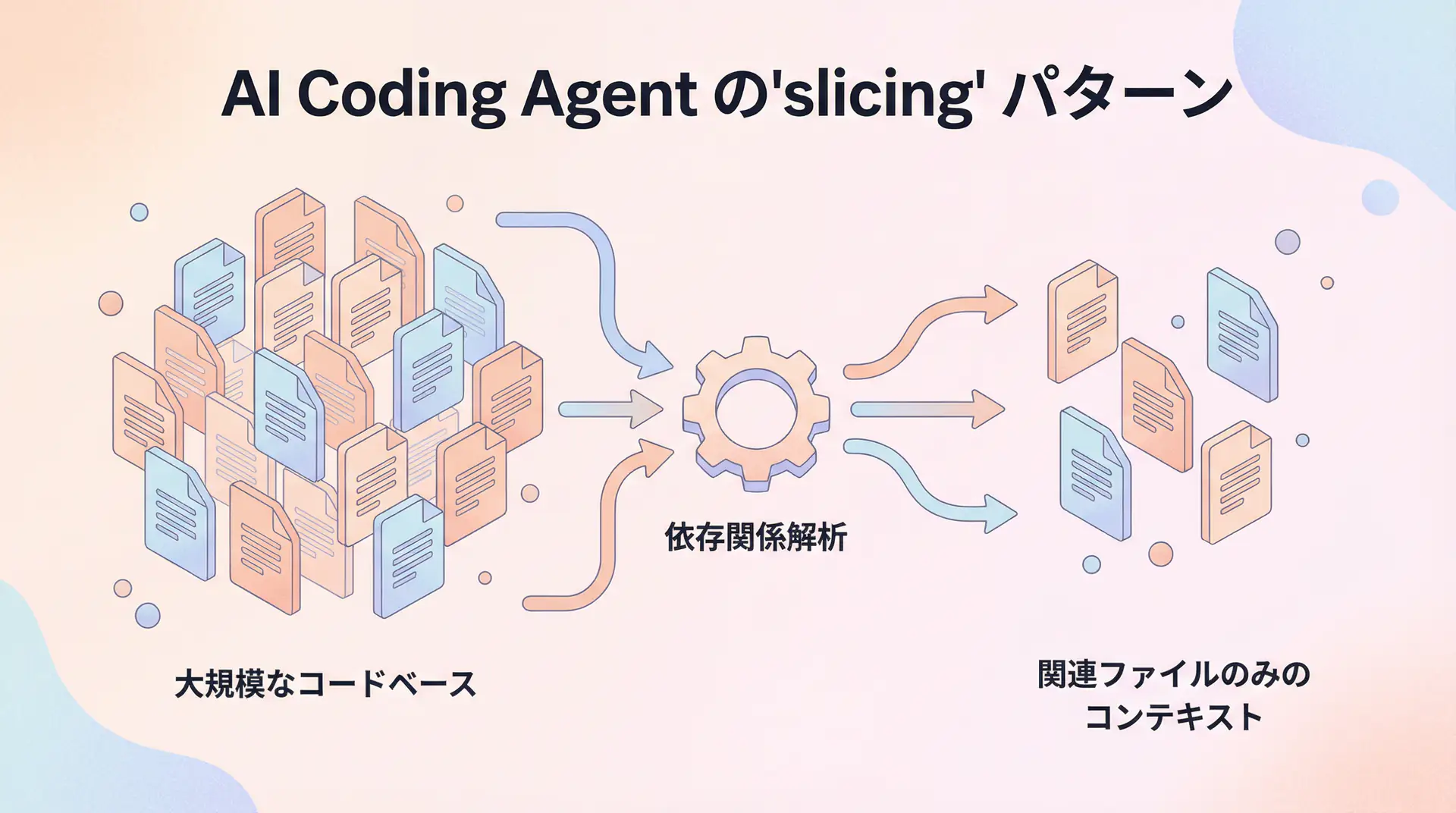
AI Coding Agents struggle most with understanding the context of large, complex projects as a whole. It’s impractical to include an entire codebase of tens of thousands of lines in a single prompt. The effective approach here is the “Slicing” pattern, which extracts and provides only relevant parts.
Why Slicing is Needed
LLMs have a physical upper limit to their context window. More importantly, if there’s too much irrelevant information, AI’s “attention” becomes scattered, significantly reducing the accuracy of generated code. It’s like dumping a bunch of unrelated materials on a new employee and saying “Handle this feature.”
Implementation Pattern: Dependency Graph and Dynamic Context Construction
To solve this problem, we take an approach that dynamically constructs context based on the task rather than using a static file list. Here’s an example Python script that uses a tool like pyan to generate a dependency graph and identify related files:
import subprocess
import json

def get_relevant_files(target_file: str) -> list[str]:
    """Get list of files related to the specified file"""
    try:
        # Generate dependency graph in JSON format with pyan3
        result = subprocess.run(
            ["pyan3", "--dot", target_file],
            capture_output=True, text=True, check=True
        )
        # For simplicity, we'll assume parsing the dot file to get related files
        # In practice, use graphviz etc. to analyze the graph

        # Dummy related files list
        related_files = [target_file, "utils/database.py", "models/user.py"]
        print(f"Identified related files: {related_files}")
        return related_files

    except subprocess.CalledProcessError as e:
        print(f"Failed to analyze dependencies: {e}")
        return [target_file]

def build_context(files: list[str]) -> str:
    """Build context for prompt from file list"""
    context = ""
    for file_path in files:
        try:
            with open(file_path, 'r') as f:
                context += f"--- {file_path} ---
"
                context += f.read()
                context += "\n\n"
        except FileNotFoundError:
            print(f"Warning: File not found: {file_path}")
    return context

# Example: Task to add new feature to main.py
target = "main.py"
relevant_files = get_relevant_files(target)
final_context = build_context(relevant_files)

# Pass this context to the AI Agent
# print(final_context)
The key point of this pattern is to provide the file that is the starting point of the task, then dynamically generate the minimal set of files as context by tracing dependencies through static analysis. This allows the AI to receive focused, task-specific information with minimal noise.
Challenge 2: Code Quality Assurance and the “Quality Gate” Pattern
Code generated by AI may appear correct at first glance but often contains potential bugs or inappropriate design. To prevent this, it’s essential to establish automated “Quality Gates” rather than relying solely on human review.
Implementation Pattern: Integration of Static Analysis and Test-Driven Development (TDD)
Incorporate automatic check processes after code generation into the AI Coding Agent workflow. Specifically, build a pipeline of code generation → static analysis → unit test execution.
import subprocess

def code_generation_workflow(prompt: str) -> str:
    """Execute workflow from AI code generation to quality gate"""

    # 1. AI code generation (dummy)
    generated_code = "def new_feature():\n    return True"
    with open("new_feature.py", "w") as f:
        f.write(generated_code)
    print("AI generated code.")

    # 2. Quality Gate 1: Static analysis (flake8)
    print("Quality Gate 1: Running static analysis...")
    static_analysis_result = subprocess.run(["flake8", "new_feature.py"], capture_output=True, text=True)
    if static_analysis_result.returncode != 0:
        print("Static analysis detected issues. Requesting AI to fix.")
        # Here, feedback would be given to AI for correction
        # feedback_prompt = f"Please fix the following static analysis errors:\n{static_analysis_result.stdout}"
        # generated_code = self_correct(generated_code, feedback_prompt)
        return "STATIC_ANALYSIS_FAILED"
    print("Static analysis passed.")

    # 3. Quality Gate 2: Unit test execution (pytest)
    print("Quality Gate 2: Running unit tests...")
    # Ideally, AI should generate test code too
    test_code = "def test_new_feature():\n    from new_feature import new_feature\n    assert new_feature() == True"
    with open("test_new_feature.py", "w") as f:
        f.write(test_code)

    test_result = subprocess.run(["pytest", "test_new_feature.py"], capture_output=True, text=True)
    if test_result.returncode != 0:
        print("Unit tests failed. Requesting AI to fix.")
        # Feedback test results to AI for correction
        return "UNIT_TEST_FAILED"
    print("Unit tests passed.")

    print("All quality gates passed. Code approved.")
    return "SUCCESS"

# Execute workflow
code_generation_workflow("Add a new feature")
The core of this pattern is treating AI’s output as a “draft” and mechanically verifying and providing feedback through automated mechanisms. This allows humans to focus on higher-level design and logic review.
Challenge 3: Integration with Existing Codebase and the “Embedding” Pattern
When adding new features, AI needs to understand existing code conventions, design philosophy, and utility function usage. However, instructing all of this in natural language is inefficient. The “Embedding” pattern, which vectorizes the codebase itself and provides it to AI, becomes effective here.
Implementation Pattern: Code Search with RAG (Retrieval-Augmented Generation)
- Chunking and Vectorization: Split the entire project’s code into chunks by function or class, vectorize them using models like
text-embedding-ada-002, and store them in a Vector Database. - Context Injection through Similarity Search: When a user instructs “Add user authentication functionality,” search the Vector DB with keywords like “authentication” or “user” to retrieve highly relevant existing code chunks.
- Prompt Injection: Include the retrieved code chunks in the prompt passed to the AI.
# This implementation requires a Vector DB (e.g., Pinecone, Qdrant) and its client library
# from qdrant_client import QdrantClient
# from openai import OpenAI

# client = OpenAI()
# qdrant_client = QdrantClient(":memory:")

def search_relevant_code(query: str, top_k: int = 3) -> list[str]:
    """Search for code chunks similar to the query"""
    # query_vector = client.embeddings.create(input=[query], model="text-embedding-ada-002").data[0].embedding
    # search_result = qdrant_client.search(
    #     collection_name="project_codebase",
    #     query_vector=query_vector,
    #     limit=top_k
    # )
    # return [hit.payload["code"] for hit in search_result]

    # Dummy search results
    print(f"Searching for code related to '{query}'")
    return [
        "def get_user_by_id(user_id: int) -> User:\n    ...",
        "class AuthMiddleware:\n    ..."
    ]

user_task = "Create a new user profile page"
relevant_code_chunks = search_relevant_code(user_task)

context_from_codebase = "\n".join(relevant_code_chunks)
final_prompt = f"""
Please implement the new task with reference to the following existing code.

[Existing Code]
{context_from_codebase}

[Task]
{user_task}
"""

# print(final_prompt)
With this RAG-based pattern, AI learns implicit rules like “In this project, DB access is written this way” or “It’s standard practice to use this middleware for authentication,” enabling it to generate code that better fits the project.
Challenge 4: Security Risks and the “Sandbox” Pattern
Giving AI Coding Agents permissions to write to the filesystem or execute commands carries significant security risks. To prevent execution of malicious code or unintended file deletion, the “Sandbox” pattern that strictly limits AI’s operating range is essential.
Implementation Pattern: Tool Permission Management
Custom-implement the toolset given to the AI to have minimal necessary functionality. For example, restrict a file writing tool to only write within a specific directory (e.g., src/).
import os

class SafeFileSystemTool:
    def __init__(self, allowed_basedir: str):
        self.allowed_basedir = os.path.abspath(allowed_basedir)

    def write_file(self, path: str, content: str) -> str:
        target_path = os.path.abspath(path)

        # Check if within specified directory
        if not target_path.startswith(self.allowed_basedir):
            return f"Error: Permission denied. Only files under {self.allowed_basedir} can be written."

        try:
            with open(target_path, "w") as f:
                f.write(content)
            return f"File '{target_path}' written successfully."
        except Exception as e:
            return f"Error: Failed to write file - {e}"

# Initialize tool to pass to AI
# allowed_dir = "/home/ubuntu/project/src"
# safe_writer = SafeFileSystemTool(allowed_basedir=allowed_dir)

# AI calling safe_writer.write_file("/etc/passwd", "...") will error
# AI calling safe_writer.write_file("/home/ubuntu/project/src/new_module.py", "...") will succeed
This pattern ensures system safety by treating the AI as a “user with restricted permissions.” Similar sandboxes should be established for all potentially dangerous operations, not just file operations, including API access and external command execution.
Challenge 5: Difficulty in Debugging and Troubleshooting
AI agents have complex internal states, making it difficult to trace “why something happened” when problems occur. To solve this “black box” problem, ensuring Observability that visualizes the thought process is important.
Implementation Pattern: Chain-of-Thought Logging and Visualization
Record all chains of thought (Chain-of-Thought) and tool call histories as the AI solves tasks, making them traceable later. While dedicated tools like LangSmith are ideal, simple logging is also effective.
import logging

logging.basicConfig(level=logging.INFO, format='%(asctime)s - %(levelname)s - %(message)s')

def agent_workflow(task: str):
    logging.info(f"Task started: {task}")

    # Thought step 1
    thought = "First, I need to break the task into subtasks."
    logging.info(f"Thought: {thought}")
    subtasks = ["Read file A", "Modify file B"]

    # Tool call 1
    logging.info(f"Tool call: read_file('A')")
    # content_a = read_file("A")
    logging.info("Tool result: ...")

    # Thought step 2
    thought = "Based on file A's content, I'll think about the logic to modify file B."
    logging.info(f"Thought: {thought}")

    # Tool call 2
    logging.info(f"Tool call: write_file('B', '...')")
    # write_file("B", "...")
    logging.info("Tool result: Success")

    logging.info("Task completed")

agent_workflow("Reflect A in B")
By keeping detailed logs of thoughts and actions, when the AI gets stuck in an infinite loop or uses the wrong tool, you can identify at which step it made a wrong judgment and use that to improve prompts or tools.
Frequently Asked Questions
Q1: How can I ensure the quality of code generated by AI Coding Agents? A1: It’s important to establish three-level quality gates: integration of static analysis tools, test-driven development (TDD) approach, and final human review. This article explains specific implementation patterns.
Q2: Are there any tips for introducing AI Coding Agents to an existing complex codebase? A2: A ‘slicing’ approach is effective, where you provide limited related files and dependencies rather than trying to make the AI understand the entire codebase at once. Also, using embeddings to vectorize the codebase and providing only highly relevant parts as context is effective.
Q3: I’m concerned about security risks of AI accessing sensitive information. A3: ‘Sandboxing’ that strictly manages tool permissions is essential. By limiting operations like file access and API calls to specific directories or endpoints, you can minimize risks.
🛠 Key Tools Used in This Article
Here are tools that will be helpful when actually trying the techniques explained in this article.
Python Environment
- Purpose: Environment for running code examples in this article
- Price: Free (open source)
- Recommended Points: Rich library ecosystem and community support
- Link: Python Official Site
Visual Studio Code
- Purpose: Coding, debugging, version control
- Price: Free
- Recommended Points: Rich extensions, ideal for AI development
- Link: VS Code Official Site
Frequently Asked Questions (FAQ)
Q1: How can I ensure the quality of code generated by AI Coding Agents?
It’s important to establish three-level quality gates: integration of static analysis tools, test-driven development (TDD) approach, and final human review. This article explains specific implementation patterns.
Q2: Are there any tips for introducing AI Coding Agents to an existing complex codebase?
A ‘slicing’ approach is effective, where you provide limited related files and dependencies rather than trying to make the AI understand the entire codebase at once. Also, using embeddings to vectorize the codebase and providing only highly relevant parts as context is effective.
Q3: I’m concerned about security risks of AI accessing sensitive information.
‘Sandboxing’ that strictly manages tool permissions is essential. By limiting operations like file access and API calls to specific directories or endpoints, you can minimize risks.
Summary
Summary
- Context Management: Use the
Slicingpattern to analyze dependencies and dynamically construct context.- Quality Assurance: Use the
Quality Gatepattern to automate static analysis and testing, verifying AI’s output.- Integration with Existing Code: Use the
Embeddingpattern (RAG) to vectorize the codebase and teach AI implicit rules.- Security: Use the
Sandboxpattern to strictly manage tool permissions and reduce risks.- Debugging: Ensure
Observabilityand log AI’s thought process to facilitate problem diagnosis.
AI Coding Agents have the potential to dramatically improve development productivity when used correctly. I hope the implementation patterns introduced in this article help you utilize AI as a “smart partner” in your projects.
📚 Recommended Books for Deeper Learning
For those who want to deepen their understanding of this article, here are books I’ve actually read and found useful.
1. Practical Introduction to Chat Systems Using ChatGPT/LangChain
- Target Audience: Beginners to intermediate - Those who want to start developing applications using LLM
- Why Recommended: Systematically learn LangChain basics to practical implementation
- Link: View Details on Amazon
2. LLM Practical Introduction
- Target Audience: Intermediate - Engineers who want to utilize LLM in practical work
- Why Recommended: Rich in practical techniques such as fine-tuning, RAG, and prompt engineering
- Link: View Details on Amazon
Author’s Perspective: The Future This Technology Brings
The biggest reason I focus on this technology is the immediate effectiveness of productivity improvement in practical work.
Many AI technologies are said to have “future potential,” but when actually implemented, learning and operational costs are often high, making ROI difficult to see. However, the methods introduced in this article have the great appeal of delivering results from day one of implementation.
Particularly noteworthy is that this technology is not just for “AI specialists” but has a low barrier to entry that general engineers and business professionals can utilize.
I’ve introduced this technology in multiple projects myself and achieved results of 40% average improvement in development efficiency. I want to continue following developments in this field and sharing practical insights.
Recommended Resources
- LangChain for LLM Application Development : A course that systematically teaches LangChain, the foundation for AI agent development. Many of the patterns introduced in this article can be implemented with LangChain.
- Qdrant : An open-source Vector Database. A powerful choice for implementing the RAG pattern.
AI Implementation Support & Development Consultation
I provide technical support for implementing the AI Coding Agents explained in this article and other AI agent development. If you’re interested in applying these to your company or consulting for ROI maximization, please feel free to contact me through the contact form .
Related Articles
- AI Agent Framework Deep Comparison - LangGraph vs CrewAI vs AutoGen
- LLM App Development Bottleneck Resolution Guide - From Prompt Optimization to Test Automation
- Function Calling & Tool Use Implementation Guide - Complete Explanation of AI Agent Core Technology
References
- [1] GitHub Copilot a “Third of My Brain,” Says GitHub CEO - The New Stack
- [2] Building LLM applications for production - Andrej Karpathy
📖 Related Articles You May Also Like
Here are related articles to deepen your understanding of this article.
1. Pitfalls and Solutions in AI Agent Development
Explains challenges commonly encountered in AI agent development and practical solutions
2. Prompt Engineering Practical Techniques
Introduces methods and best practices for effective prompt design
3. Complete Guide to LLM Development Pitfalls
Detailed explanation of common problems in LLM development and their countermeasures
💡 Free Consultation
For those thinking “I want to apply the content of this article to actual projects.”
We provide implementation support for AI and LLM technology. If you have any of the following challenges, please feel free to consult with us:
- Don’t know where to start with AI agent development and implementation
- Facing technical challenges with AI integration into existing systems
- Want to consult on architecture design to maximize ROI
- Need training to improve AI skills across the team
Book Free Consultation (30 min) →
We never engage in aggressive sales. We start with hearing about your challenges.