In the field of business automation, I often hear concerns like “I wrote a script, but it stopped working with just a slight change in specifications.” Traditional RPA (Robotic Process Automation) and Python script-based automation are excellent at reliably running predetermined paths, but they have fragility that causes them to stumble over even a single stone on the roadside. Just a change in screen layout or unexpected error codes in API responses can halt the automation process.
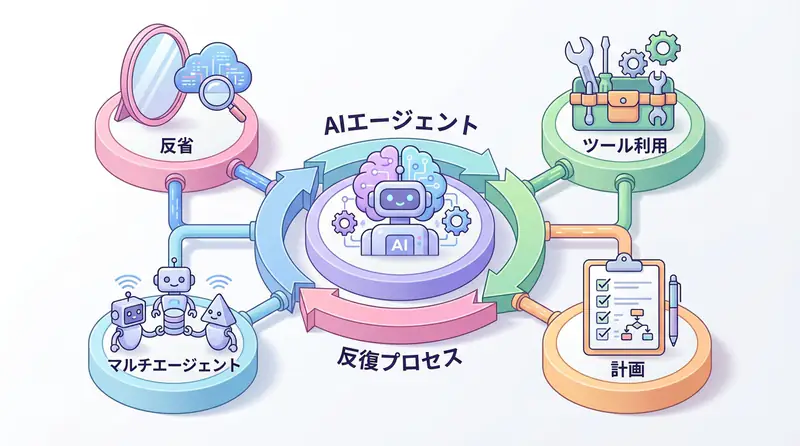
The “AI Agent” can be a breakthrough turning point to solve this “fragility.” An AI agent is not just a chatbot but a system that has an LLM (Large Language Model) as its “brain,” uses tools appropriately to achieve given goals, and executes tasks while self-correcting its plans.
This article explains the internal workings of AI agents for engineers, focusing particularly on the important “ReAct (Reason + Act)” pattern, and explains implementation methods using actually working Python code. By looking at practical code including error handling and logging, not just theory, we provide knowledge that can be applied to business automation starting tomorrow.
Decisive Differences Between Traditional Automation and AI Agents
Until now, automation has mainly operated in the world of “imperative programming.” “If A, then do B,” “If error, then log C and terminate” - all branches had to be predefined by humans. While this makes system behavior predictable, it has the disadvantage of exponentially increasing exception handling costs.
In contrast, AI agents take a “declarative” or “goal-oriented” approach. By simply giving a goal like “analyze sales data and create a report,” the agent autonomously assembles processes like the following:
- Select tools for database access
- Generate appropriate SQL queries to retrieve data
- If data is incomplete, search for supplementary data from the web
- Summarize analysis results and send via email
What’s important here is that if a SQL error occurs in step 2, the agent can infer “I might have made a syntax error in the query” and rewrite the query to retry. This cycle of “reasoning” and “execution” is what distinguishes AI agents from traditional scripts.
Internal Structure of AI Agents: ReAct Pattern and Tool Usage
As a core mechanism widely adopted in AI agents, the “ReAct (Reasoning and Acting)” pattern is used. This is a method that solves complex problems step by step by having the LLM loop through “thinking,” “acting,” and “observing.”
Specifically, the flow is as follows:
- Thinking: Strategize what to do next in response to user requests
- Action: Execute selected tools (search, calculation, DB access, etc.)
- Observation: Check output results from tools
- Loop: Return to 1 if results are insufficient, generate final answer if sufficient
Visualizing this loop results in the following architecture:
When building agents, what “tools” to provide around this LLM is the key to design. Tools range from simple functions to external API wrappers and code execution environments.
Business Use Case: Automation of Incident Response
As a concrete business application, let’s consider “automation of incident response.” Currently, many SREs (Site Reliability Engineers) and infrastructure personnel are woken up by late-night alert notifications, checking logs and performing actions like restarts and rollbacks.
By introducing AI agents, the following processes can be automated:
- Alert Reception: Receive error messages from monitoring tools
- Situation Analysis: Agent collects related logs and infers error causes (e.g., memory leak, external API down)
- Countermeasure Consideration: Search past cases and documentation to identify appropriate countermeasures (e.g., container restart)
- Execution and Approval: Automatically execute restart commands if impact scope is small, or request approval from responsible personnel via Slack if scope is large
This allows engineers to focus on high-priority responses and their original development work.
Implementation Example: Autonomous Data Analysis Agent in Python
Now, let’s actually implement a simple AI agent using Python. Here, we write code that clearly understands the internal workings of agents by combining OpenAI API and Python’s standard features without using expensive external frameworks.
This agent autonomously handles the task of “calculating the average of given numerical data and checking if it exceeds a certain threshold.”
Prerequisites
Please install the necessary libraries:
pip install openai python-dotenvSource Code
The following code is a practical example including error handling, logging, and ReAct loop implementation.
import os
import json
import logging
from typing import List, Dict, Any, Optional
from openai import OpenAI

# Logging configuration
logging.basicConfig(
    level=logging.INFO,
    format='%(asctime)s - %(levelname)s - %(message)s'
)
logger = logging.getLogger(__name__)

class Tool:
    """Base class for tools available to the agent"""
    def __init__(self, name: str, description: str):
        self.name = name
        self.description = description

    def run(self, **kwargs) -> str:
        raise NotImplementedError

class CalculatorTool(Tool):
    """Tool for performing calculations"""
    def __init__(self):
        super().__init__(
            name="calculator",
            description="Receives a list of numbers and calculates the average. Requires 'numbers': [list] as argument."
        )

    def run(self, numbers: List[float]) -> str:
        try:
            if not numbers:
                return "Error: Number list is empty."
            avg = sum(numbers) / len(numbers)
            logger.info(f"Calculation executed: Input={numbers}, Average={avg}")
            return json.dumps({"average": avg})
        except Exception as e:
            logger.error(f"Calculator tool error: {e}")
            return f"Error: Problem occurred during calculation ({e})"

class DatabaseTool(Tool):
    """Tool to retrieve data from simulated database"""
    def __init__(self):
        super().__init__(
            name="database",
            description="Retrieves data of a specific ID from the database. Requires 'id': int as argument."
        )
        # Simulated data
        self.mock_data = {
            1: {"id": 1, "sales": [100, 200, 150]},
            2: {"id": 2, "sales": [5000, 6000, 5500]},
            3: {"id": 3, "sales": [10, 20, 30]}
        }

    def run(self, id: int) -> str:
        try:
            data = self.mock_data.get(id)
            if data:
                logger.info(f"DB retrieval: ID={id}, Data={data}")
                return json.dumps(data)
            else:
                logger.warning(f"DB retrieval failed: ID={id} not found")
                return f"Error: Data for ID {id} was not found."
        except Exception as e:
            logger.error(f"DB tool error: {e}")
            return f"Error: Problem occurred during data retrieval ({e})"

class Agent:
    """Simple agent implementing ReAct pattern"""
    def __init__(self, api_key: str):
        self.client = OpenAI(api_key=api_key)
        self.tools: Dict[str, Tool] = {
            "calculator": CalculatorTool(),
            "database": DatabaseTool()
        }
        self.system_prompt = self._build_system_prompt()

    def _build_system_prompt(self) -> str:
        tool_descriptions = "\n".join([
            f"- {tool.name}: {tool.description}"
            for tool in self.tools.values()
        ])
        return f"""
You are a helpful AI assistant.
Available tools:
{tool_descriptions}

For user questions, please output thoughts and actions in the following JSON format:
{{
  "thought": "Thinking about what to do next",
  "action": "Tool name or 'final_answer'",
  "action_input": {{Input parameters to tool}} or "Final answer string"
}}

Rules:
1. Always use tools to check information before answering.
2. When final answer is determined, set action to 'final_answer'.
3. action_input must be valid JSON format or string.
"""

    def _call_llm(self, messages: List[Dict[str, str]]) -> Dict[str, Any]:
        """Call LLM and parse response"""
        try:
            response = self.client.chat.completions.create(
                model="gpt-4o-mini", # Choose cost-effective model
                messages=messages,
                temperature=0
            )
            content = response.choices[0].message.content
            logger.info(f"LLM response: {content}")
            return json.loads(content)
        except json.JSONDecodeError:
            logger.error("Could not parse LLM response as JSON")
            return {
                "thought": "Failed to parse response",
                "action": "final_answer",
                "action_input": "Sorry. An internal processing error occurred."
            }
        except Exception as e:
            logger.error(f"LLM API error: {e}")
            raise

    def run(self, user_query: str, max_steps: int = 5) -> str:
        """Agent execution loop"""
        messages = [
            {"role": "system", "content": self.system_prompt},
            {"role": "user", "content": user_query}
        ]

        for step in range(max_steps):
            logger.info(f"--- Step {step + 1} ---")

            # LLM decision on thinking and action
            llm_response = self._call_llm(messages)

            action = llm_response.get("action")
            action_input = llm_response.get("action_input")
            thought = llm_response.get("thought", "")

            # If final answer
            if action == "final_answer":
                logger.info("Final answer generated.")
                return action_input

            # If tool execution
            if action in self.tools:
                tool = self.tools[action]
                observation = tool.run(**action_input)

                # Add observation result to conversation history
                messages.append({
                    "role": "assistant",
                    "content": json.dumps(llm_response)
                })
                messages.append({
                    "role": "user",
                    "content": f"Observation result: {observation}"
                })
            else:
                # Unknown action
                error_msg = f"Error: Unknown action '{action}'. Please select from available tools."
                logger.warning(error_msg)
                messages.append({
                    "role": "user",
                    "content": error_msg
                })

        return "Reached step limit. Could not complete task."

if __name__ == "__main__":
    # Execution example
    # Get API key from environment variable or input directly (recommend using .env file in practice)
    api_key = os.getenv("OPENAI_API_KEY")
    if not api_key:
        print("Error: OPENAI_API_KEY environment variable is not set.")
        exit(1)

    agent = Agent(api_key=api_key)

    # Complex task: Retrieve data with ID=2 and calculate average sales
    query = "Retrieve data with ID 2 from the database and calculate the average sales."
    print(f"User: {query}")

    try:
        result = agent.run(query)
        print(f"Agent: {result}")
    except Exception as e:
        print(f"Exception occurred during execution: {e}")
Code Explanation
This implementation contains several important elements required for production-level code.
- Strict Logging: Using the
loggingmodule to record LLM thinking processes, tool inputs/outputs, and error situations in detail. Essential for tracing why the agent reached certain conclusions later. - Error Handling: Since LLM output isn’t always JSON, we catch
JSONDecodeError. We also wrap tool execution exceptions intry-exceptblocks, feeding error messages back to the LLM to attempt recovery. - Tool Abstraction: Defining the
Toolclass as a base class allows extending with new features (e.g., Slack notification or email sending) without changing existing agent logic.
When you run this code, you should see the agent first select the database tool to retrieve data with ID 2. After observing the result, it uses the calculation tool to compute the average and finally returns the answer to the user - all autonomously within the for loop.
Summary
AI agents are a powerful means to handle “unstructured problems” and “changing situations” that traditional scripts couldn’t address. However, due to this freedom, they also carry risks of uncontrollable behavior. Understanding the ReAct pattern implementation and importance of logging introduced here is the first step toward building reliable business automation systems that go beyond mere experiments.
- Combining LLM reasoning capabilities with tool execution capabilities enables flexible automation
- The ReAct pattern (Think-Act-Observe) is fundamental to agent design
- In production, detailed logging and error handling support agent reliability
- Tool design should be modular to enhance extensibility
Frequently Asked Questions
Q: What is the biggest difference between AI agents and traditional RPA (Robotic Process Automation)?
A: While traditional RPA mechanically executes predetermined procedures, AI agents have LLM as their brain and possess flexibility to plan and modify execution procedures according to the situation. They can handle unstructured data and respond to unexpected errors.
Q: What is the most important point to note when implementing AI agents?
A: The risk of uncontrollable behavior due to “hallucinations (lies)” or “misuse of tools”. To prevent this, it’s essential to set up guardrails (human approval processes), thorough monitoring of logs, and limit the agent’s scope of action to the minimum necessary tools.
Q: What libraries should be used for code implementation?
A: This article uses Python’s standard libraries and OpenAI API to understand internal mechanisms, but in practice, frameworks like LangChain, LangGraph, and AutoGen can be utilized to streamline state management and error handling.
Recommended Resources
- Book: “Building AI Applications with LangChain” (by Valentina Alto) - Covers basics to applications of agent construction using LangChain.
- Tool: LangSmith - Platform for visualizing and debugging agent execution history. Useful for understanding complex agent behavior.
- SaaS: CrewAI - Orchestration framework where multiple agents (roles) coordinate to complete tasks. Consider when aiming for more advanced automation.
AI Implementation Support & Development Consultation
If you’re a manager who wants to incorporate AI agents into your company’s workflow but don’t know where to start, or want to proceed with technical verification, please feel free to consult with us.
References
[1] ReAct: Synergizing Reasoning and Acting in Language Models (Paper) [2] OpenAI API Documentation - Function Calling [3] LangChain Documentation - Agents