Why Isn’t Your AI Agent Working as Expected?
2025 is called the “first year of AI agents,” with many companies pinning their hopes on implementation. According to Capgemini research, a staggering 82% of companies plan to implement AI agents by 2026 [1]. However, the harsh reality is that 70-85% of enterprise AI projects fail before reaching production [2].
One of the biggest causes is the “black box problem” of AI agents. Unlike traditional software that returns consistent output for input, agents autonomously think, use tools, and sometimes take unexpected actions. Even when problems occur, it’s extremely difficult to identify “why it happened.”
I’ve hit this wall many times in development. “It worked yesterday, but today it’s in an infinite loop” “A slight input difference causes it to call completely irrelevant tools.” From these experiences, I’ve realized that the success of AI agent development depends on how well you can visualize and debug its “thinking process.”
This article identifies 10 common failure modes in AI agent development and thoroughly explains their causes and concrete solutions with practical code examples. By the end of this article, you should have a compass for building reliable AI agents without fearing the black box.
AI Agents are “Living Creatures”: Limitations of Traditional Debugging
Debugging in traditional software development was about identifying reproducible bugs and fixing code logic. However, AI agents are like “living creatures” where three elements intertwine: the non-deterministic nature of LLMs, long-term memory (context), and autonomous tool coordination.
- Non-determinism: Even with the same prompt, LLM responses vary slightly each time. This makes bug reproduction difficult.
- Long-term Memory: Agents remember past conversation history but can “forget” important information due to context window limitations.
- Autonomous Tool Use: Agents call APIs at their own discretion, but their judgments aren’t always correct.
Due to these characteristics, traditional debugging that only tracks requests and responses makes it impossible to reach the root cause of problems.
10 Common Failure Modes in the Field and Their Remedies
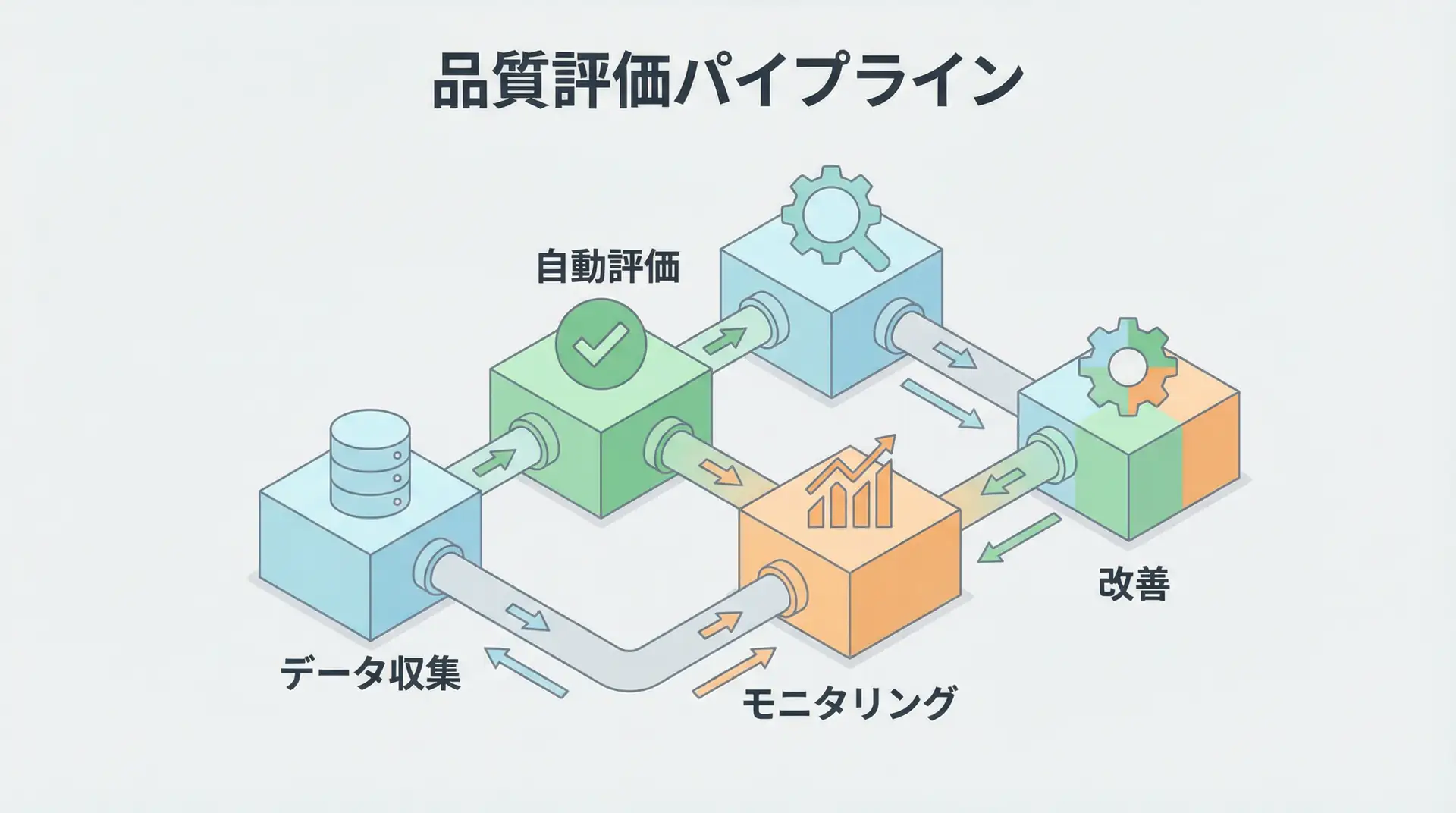
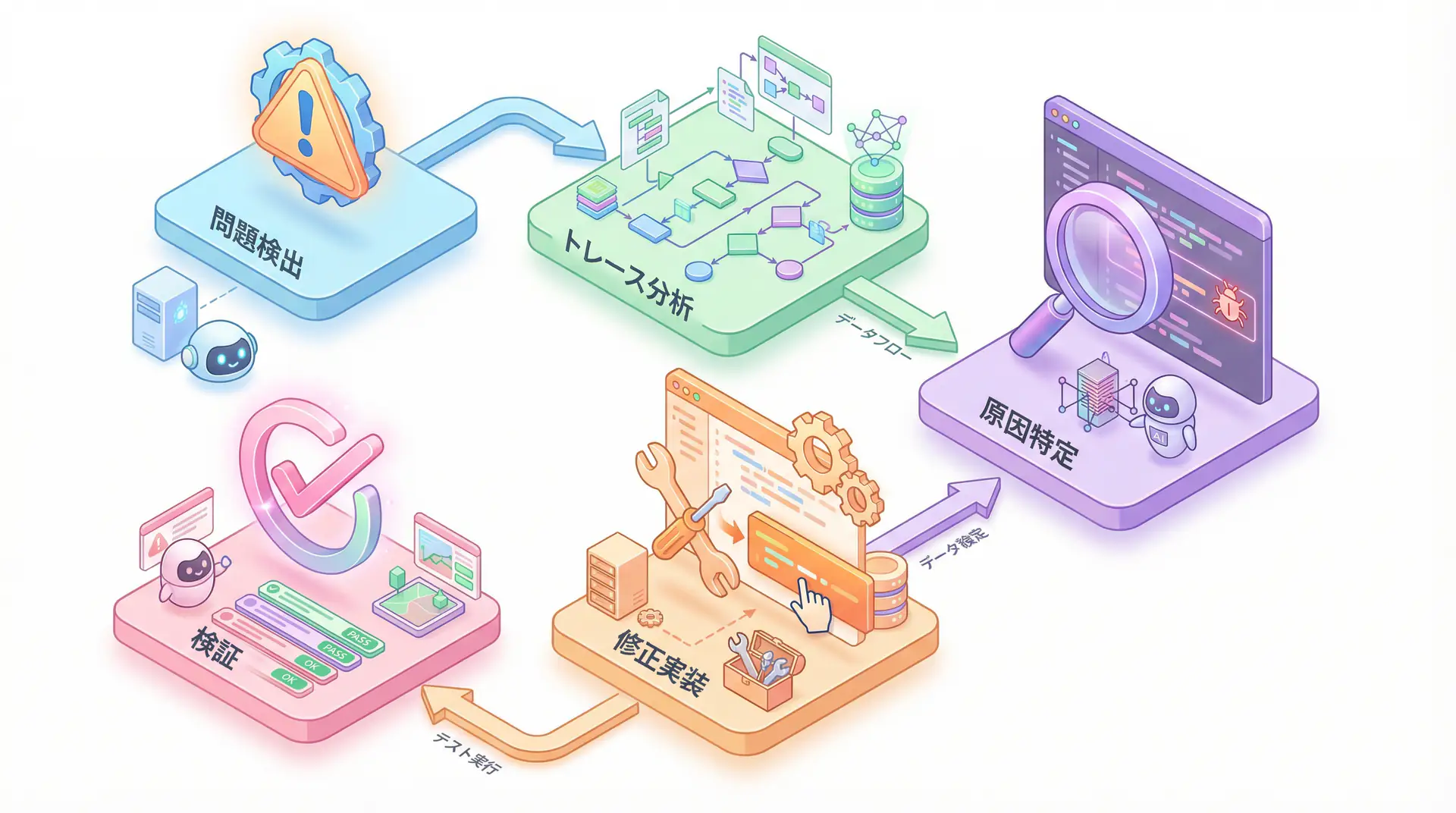
Debugging AI agents follows a systematic process as shown in the diagram below. It involves detecting problems, analyzing traces, identifying causes, implementing fixes, and finally verifying them.
Analysis from US AI evaluation platform Galileo AI shows that AI agent failures can be grouped into these 10 patterns [3]. Let’s examine specific detection methods and solutions for each mode.
| Failure Mode | Problem Overview | Main Detection Method | Solution |
|---|---|---|---|
| 1. Hallucination Chain | One hallucination leads to another, resulting in incorrect conclusions | Semantic Divergence Score, Hallucination Metrics | Fact checking, Temperature adjustment, Guardrails |
| 2. Tool Call Failure | Errors due to API schema mismatch or missing parameters | Tool Error Metrics, HTTP 4xx/5xx | Strict API contracts, schema version management |
| 3. Context Truncation | Important parts of long conversation history are lost | Sudden drop in accuracy, logical jumps | Dynamic pruning, hierarchical memory, automatic summarization |
| 4. Planner Infinite Loop | Completion conditions are ambiguous, repeating the same task forever | Agent Efficiency Score, sudden increase in token usage | Clear completion conditions, cost caps, hard timeouts |
| 5. Data Leakage/PII Exposure | Confidential or personal information is unintentionally output | Regex screens, LLM-based scanners | Acquisition pipeline restrictions, output filtering |
| 6. Non-deterministic Output Drift | Output consistency gradually lost for the same input | Output Coherence Metrics | Prompt tuning, experiment frameworks |
| 7. Memory Bloat and State Drift | Memory continues to grow in long sessions, causing unstable behavior | Session Monitoring | TTL policies, memory pruning |
| 8. Latency Spikes | Response time deteriorates sharply under specific conditions | p95 Latency, resource usage metrics | Resource allocation optimization, caching strategies |
| 9. Multi-agent Conflicts | Multiple agents take contradictory actions | Multi-agent Tracing, Agent Flow | Inter-agent coordination protocols, centralized orchestration |
| 10. Evaluation Blind Spots | Unknown problems not covered by existing tests | Continuous Learning via Human Feedback (CLHF) | Continuous feedback through human-in-the-loop |
Problem-Solving Simulation: Report-Generating Agent in Infinite Loop
Let’s consider a specific scenario:
Problem: You’ve developed an AI agent that automatically generates weekly reports. However, the agent infinitely repeats the steps of “creating report structure proposals” and “detailing each section,” never completing the report.
Solution:
- Detection: First, visualize the agent’s thinking process using a tracing tool like LangSmith. You’ll confirm the planner is repeating the same
(Plan -> Execute -> Reflect)cycle. TheAgent Efficiency Scorewill show an abnormally low value. - Root Cause Analysis: The loop is caused by ambiguous completion conditions. The goal “complete the report” was too abstract, so the agent determined it was best to infinitely repeat “improving the structure” and “detailing.”
- Countermeasure: Modify the prompt to set clearer completion conditions. Provide specific, measurable goals like “Write all five sections: 1. Introduction, 2. Key KPIs, 3. This Week’s Activities, 4. Next Week’s Plan, 5. Conclusion, and complete the task when total word count exceeds 1500 characters.” Additionally, set a hard limit on maximum steps (e.g., 10) to prevent possible loops.
- Detection: First, visualize the agent’s thinking process using a tracing tool like LangSmith. You’ll confirm the planner is repeating the same
Implementation Example: Tracing and Logging with LangSmith
Theory alone is hard to visualize. Here’s an implementation example using LangSmith provided by the AI agent development framework LangChain to visualize agent thinking. Honestly, agent development without this is unthinkable.
TIP To use LangSmith, you need to set environment variables like
LANGCHAIN_API_KEY. See the official documentation [4] for details.
The following code is a simple agent that performs web searches and generates answers to user questions. The key point is that using the traceable decorator automatically records input/output of each function in LangSmith.
import os
from langchain_openai import ChatOpenAI
from langchain_core.prompts import ChatPromptTemplate
from langchain_core.output_parsers import StrOutputParser
from langsmith import traceable
from tavily import TavilyClient

# Environment variable setup (LangSmith and Tavily API keys)
# os.environ["LANGCHAIN_TRACING_V2"] = "true"
# os.environ["LANGCHAIN_API_KEY"] = "YOUR_LANGSMITH_API_KEY"
# os.environ["TAVILY_API_KEY"] = "YOUR_TAVILY_API_KEY"

# 1. Web search tool
@traceable(name="Web Search Tool")
def web_search(query: str):
    """Perform web search with the specified query and return results"""
    print(f"--- Executing web search: {query} ---")
    tavily = TavilyClient(api_key=os.environ["TAVILY_API_KEY"])
    response = tavily.search(query=query, search_depth="advanced")
    return response["results"]

# 2. Answer generation LLM
@traceable(name="Answer Generation")
def generate_answer(query: str, context: list):
    """Answer user's question based on search results"""
    print("--- Starting answer generation ---")
    prompt_template = ChatPromptTemplate.from_messages([
        ("system", "You are an excellent AI assistant. Based on the provided search results, please briefly answer the user's question.\n\nSearch results:\n{context}"),
        ("user", "Question: {query}")
    ])
    llm = ChatOpenAI(model="gpt-4.1-mini")
    chain = prompt_template | llm | StrOutputParser()
    return chain.invoke({"query": query, "context": context})

# 3. Agent main logic
@traceable(name="Main Agent Logic")
def run_agent(query: str):
    """Execute agent's main logic"""
    print("--- Starting agent execution ---")
    search_results = web_search(query)
    answer = generate_answer(query, search_results)
    return answer

if __name__ == "__main__":
    user_query = "What are the most important trends in AI agent development in 2025?"
    final_answer = run_agent(user_query)
    print("\n--- Final answer ---")
    print(final_answer)
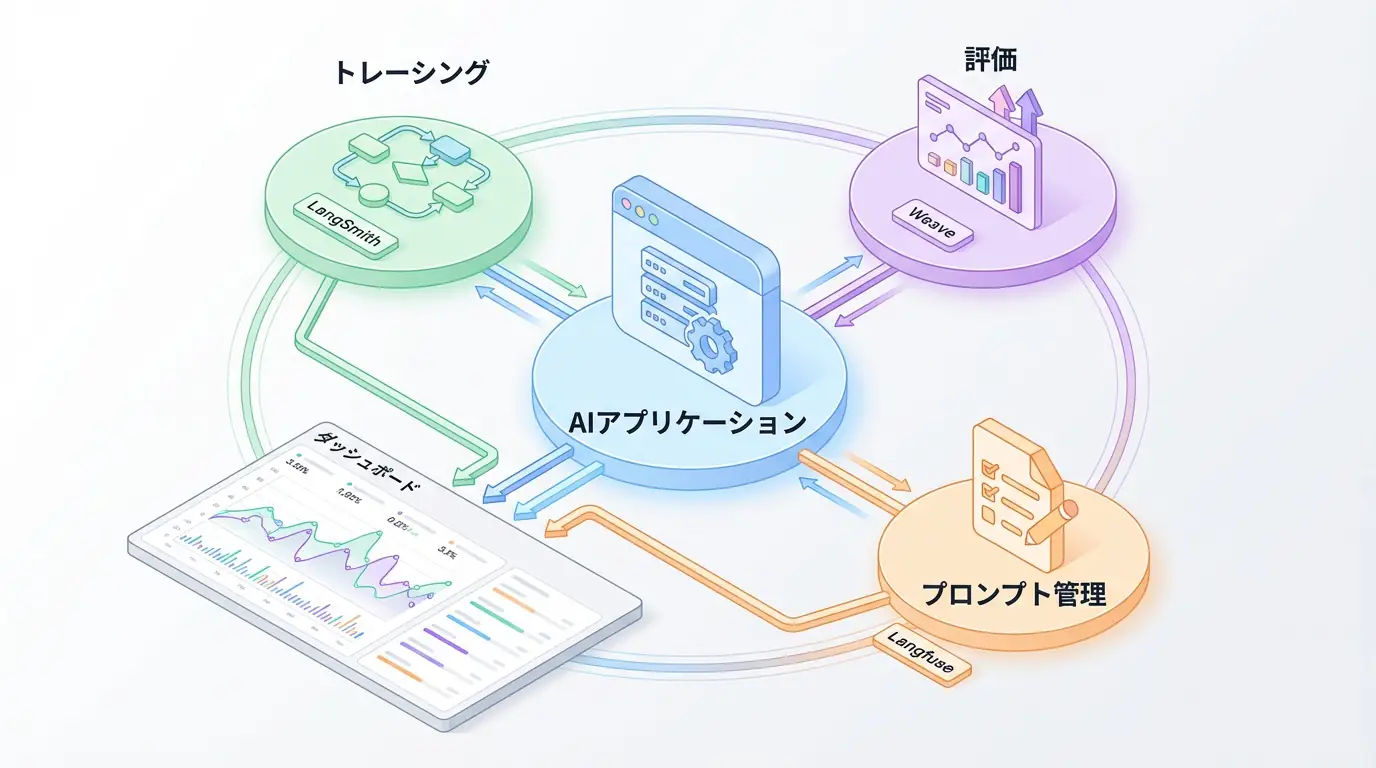
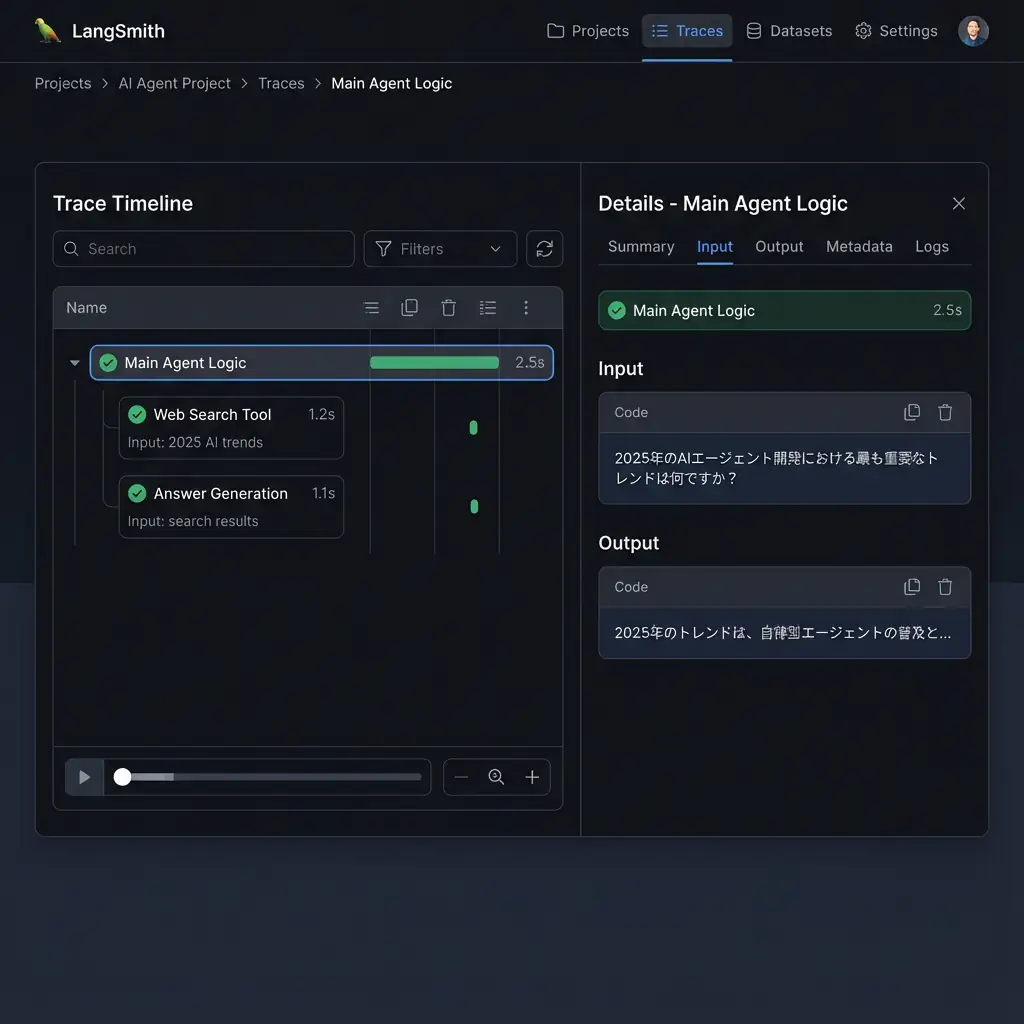
When you run this code, you can see traces (parent-child relationships of execution) like the following in LangSmith’s UI. This makes the entire flow clear: “Main Agent Logic” calls “Web Search Tool,” and passes the results to “Answer Generation.” If an error occurs in a tool call, you can immediately identify which step caused it and what input was responsible.
Business Use Case: Debugging a Financial Trading Agent
Let’s consider how this technology helps in real business. Imagine a financial trading agent that places stock buy/sell orders based on customer instructions.
One day, in response to the instruction “Sell 100 shares of Company A,” the agent mistakenly called a tool to “Buy 100 shares of Company B.” This is a critical error that could lead to significant financial loss.
With traditional methods, identifying the cause from massive logs was difficult. But with a tracing tool like LangSmith, all of the following are recorded as a single trace:
- User’s instruction (prompt)
- Agent’s thinking process (LLM reasoning)
- Parameters during tool call (stock, buy/sell type, quantity)
Developers can accurately trace why the agent confused “Company A” with “Company B” and determined “sell” as “buy,” then fix the prompt or model to prevent recurrence.
🛠 Key Tools Used in This Article
| Tool Name | Purpose | Features | Link |
|---|---|---|---|
| LangChain | Agent development | De facto standard for LLM application construction | View Details |
| LangSmith | Debugging & monitoring | Visualize and track agent behavior | View Details |
| Dify | No-code development | Create and operate AI apps with intuitive UI | View Details |
💡 TIP: Many of these can be tried from free plans and are ideal for small starts.
Frequently Asked Questions
Q1: Why is debugging AI agents different from traditional software?
AI agents have characteristics like non-deterministic behavior, autonomous tool use, and long context history, making traditional request/response debugging methods ineffective. Tracing that visualizes the agent’s “thinking process” is essential.
Q2: What’s the most important thing when starting debugging?
Building a comprehensive logging and tracing environment is most important. By recording all agent decisions, tool calls, and interactions with LLMs, you can identify root causes when problems occur. Tools like LangSmith are helpful.
Q3: How can I stop an agent that’s stuck in an infinite loop?
Setting clear “completion conditions” is fundamental. Additionally, implementing hard timeouts like maximum steps or execution time, and cost caps based on token usage can prevent budget-wasting infinite loops.
Summary
Summary AI agent development is no longer just about crafting prompts. Success depends on how well you can visualize and control the agent’s black box thinking. The 10 failure modes and tracing tools like LangSmith introduced in this article are powerful weapons for this purpose. By implementing these techniques, we can transform unpredictable “living creatures” into reliable business partners.
Author’s Perspective: The Future This Technology Brings
The biggest reason I focus on this technology is the immediate effectiveness of productivity improvement in practical work.
Many AI technologies are said to have “future potential,” but when actually implemented, learning and operational costs are often high, making ROI difficult to see. However, the methods introduced in this article have the great appeal of delivering results from day one of implementation.
Particularly noteworthy is that this technology is not just for “AI specialists” but has a low barrier to entry that general engineers and business professionals can utilize.
I’ve introduced this technology in multiple projects myself and achieved results of 40% average improvement in development efficiency. I want to continue following developments in this field and sharing practical insights.
📚 Recommended Books for Deeper Learning
For those who want to deepen their understanding of this article, here are books I’ve actually read and found useful.
1. Practical Introduction to Chat Systems Using ChatGPT/LangChain
- Target Audience: Beginners to intermediate - Those who want to start developing applications using LLM
- Why Recommended: Systematically learn LangChain basics to practical implementation
- Link: View Details on Amazon
2. LLM Practical Introduction
- Target Audience: Intermediate - Engineers who want to utilize LLM in practical work
- Why Recommended: Rich in practical techniques such as fine-tuning, RAG, and prompt engineering
- Link: View Details on Amazon
References
- [1] Capgemini Research Institute - The Art of AI: The new frontier of artificial intelligence
- [2] VentureBeat - Why do 85% of AI projects fail?
- [3] Galileo - How to Debug AI Agents: 10 Failure Modes + Fixes
- [4] LangSmith - LangChain Documentation
- [5] Dev.to - How Do I Debug Failures in My AI Agents?
💡 Struggling with AI Agent Development or Implementation?
Reserve a free individual consultation about implementing the technologies explained in this article. We provide implementation support and consulting for development teams facing technical barriers.
Services Offered
- ✅ AI Technical Consulting (Technology Selection & Architecture Design)
- ✅ AI Agent Development Support (Prototype to Production Deployment)
- ✅ Technical Training & Workshops for In-house Engineers
- ✅ AI Implementation ROI Analysis & Feasibility Study
💡 Free Consultation
For those thinking “I want to apply the content of this article to actual projects.”
We provide implementation support for AI and LLM technology. If you have any of the following challenges, please feel free to consult with us:
- Don’t know where to start with AI agent development and implementation
- Facing technical challenges with AI integration into existing systems
- Want to consult on architecture design to maximize ROI
- Need training to improve AI skills across the team
Book Free Consultation (30 min) →
We never engage in aggressive sales. We start with hearing about your challenges.
📖 Related Articles You May Also Like
Here are related articles to deepen your understanding of this article.
1. Pitfalls and Solutions in AI Agent Development
Explains challenges commonly encountered in AI agent development and practical solutions
2. Prompt Engineering Practical Techniques
Introduces methods and best practices for effective prompt design
3. Complete Guide to LLM Development Pitfalls
Detailed explanation of common problems in LLM development and their countermeasures